
ProductList container
The ProductList container manages and displays a list of recommended products based on the current product. Its behavior is driven by configuration options such as currentProduct, recId, and routing through routeProduct callbacks.
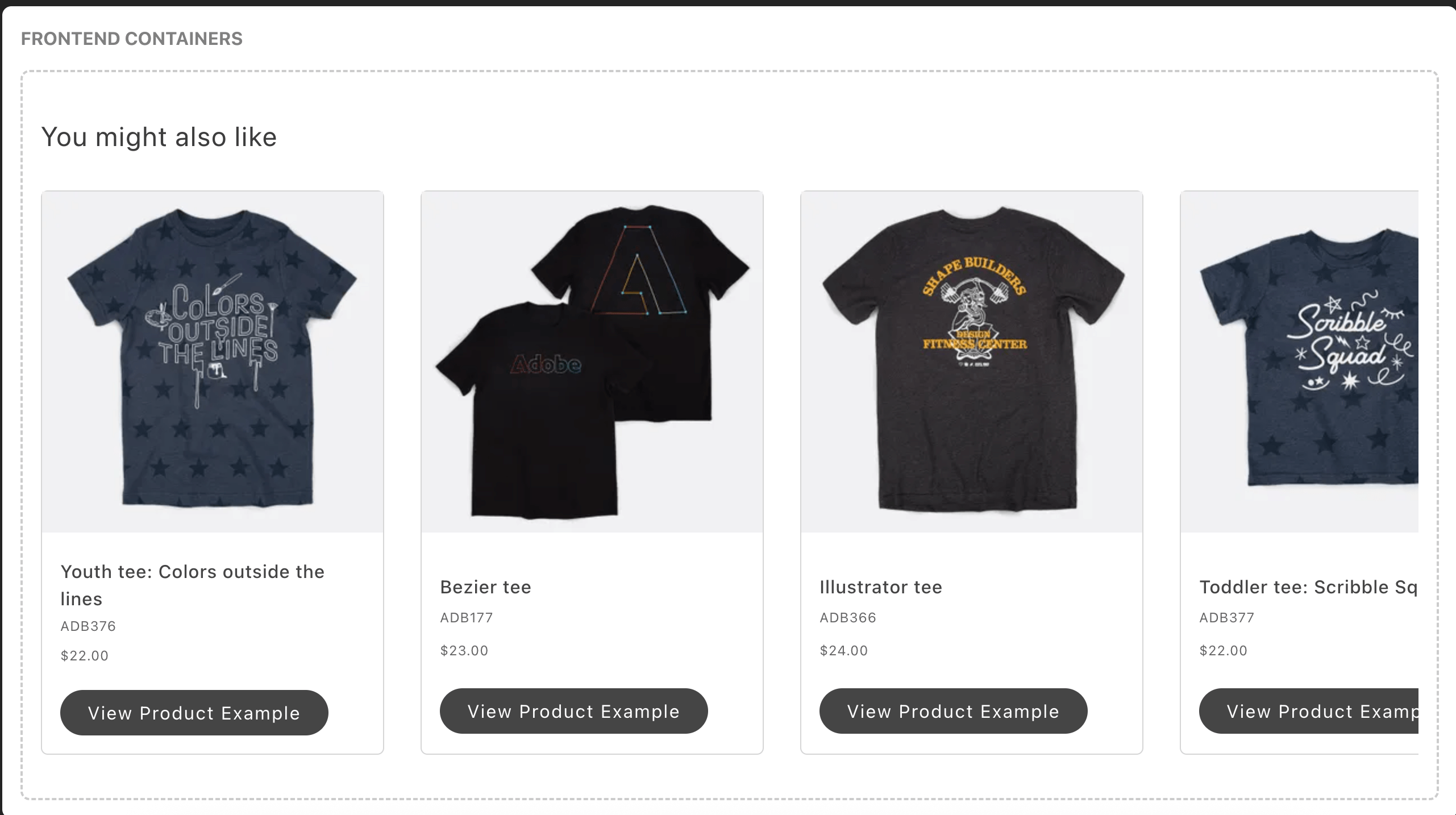
Configurations
Section titled “Configurations”The ProductList container provides the following configuration options:
Product context
Section titled “Product context”Pass product context with the optional currentProduct prop:
currentProduct?: { sku: string; price?: number };currentProduct.sku— seed product SKU for anchor-based recommendation unit types.currentProduct.price— anchor product price. Required only when the unit uses dynamic or relative price filter operators (Adobe Commerce Optimizer and Adobe Commerce as a Cloud Service only).
Whether each value is required depends on the recommendation unit type and the price filter operator:
| Unit type | Seed SKU (currentProduct.sku) | Anchor price (currentProduct.price) |
|---|---|---|
| Anchor-based (more-like-this, visual similarity, viewed-viewed, viewed-bought, bought-bought) | Required | Only for dynamic or relative price filter operators |
| Context-free (most-viewed, most-purchased, and similar popularity or behavioral types) | Not required | Not applicable |
A static price filter defines a fixed price range in the filter rule. It does not remove the need for a seed SKU on anchor-based types. Anchor-based units with static price filters work with the seed SKU alone—currentProduct.price is not sent.
How context is supplied
Section titled “How context is supplied”- PDP pages: The Commerce boilerplate block reads
currentProductfrom the Adobe Client Data Layer (ACDL) product context. You do not need to passcurrentProductin block configuration. - Non-PDP pages: There is no product context on PLP, cart, home, and similar pages. For anchor-based unit types, set
currentskuin the product-recommendations block configuration. Addcurrentpriceonly when the unit uses dynamic or relative price filter operators. - Context-free unit types: Omit
currentProduct. The dropin renders withrecIdalone on any page type.
Query routing
Section titled “Query routing”The container selects a GraphQL query based on whether anchor price is present:
- When
currentProduct.priceis present (Adobe Commerce Optimizer and Adobe Commerce as a Cloud Service only), the container usesGetRecommendationsByUnitIdsWithCurrentProduct, which supports dynamic and relative price filter operators. - When only
currentProduct.skuis present, orcurrentProductis absent, the container usesGetRecommendationsByUnitIds, which is compatible with all backend types, including PaaS.
On Adobe Commerce Optimizer and Adobe Commerce as a Cloud Service, the dropin sends currentProduct.price whenever it is available from the product context — it does not inspect the unit’s configured filter operator. The extended query is selected whenever price is present; the backend applies the anchor only when the unit’s filter uses a dynamic or relative operator, and ignores it for static or non-price filters.
The ProductListProps interface has the following shape:
export interface ProductListProps extends HTMLAttributes<HTMLDivElement> { recId: string; currentProduct?: { sku: string; price?: number; }; /** @deprecated As of v4.0.3. Use `currentProduct` instead. */ currentSku?: string; initialData?: { recommendations?: { results: RecommendationUnitModel[]; totalProducts: number; }; }; hideHeading?: boolean; routeProduct?: (item: Item) => string; cartSkus?: string[]; userPurchaseHistory?: any[]; userViewHistory?: any[]; slots?: { Heading?: SlotProps; Footer?: SlotProps; Title?: SlotProps<{ item: Item; productUrl: string; }>; Sku?: SlotProps<{ item: Item; }>; Price?: SlotProps<{ item: Item; }>; Thumbnail?: SlotProps<{ item: any; defaultImageProps: ImageProps; }>; };}The RecommendationUnitModel object has the following shape:
export interface RecommendationUnitModel { displayOrder: number; pageType: PageType; title: string; items: Item[]; totalProducts: number; typeId: string; unitId: string; unitName: string;}
export type PageType = 'Product'; // Always hardcoded to 'Product' per requirements
export interface Item { uid: string; sku: string; name: string; urlKey: string; images: ItemImage[]; price: FinalPrice; priceRange?: { minimum?: FinalPrice; maximum?: FinalPrice; }; visibility: string; queryType: string; itemType: string; inStock?: boolean;}
interface ItemImage { label: string; roles: string[]; url: string;}
export interface Price { value: number | null; currency: string | null;}
export interface FinalPrice { final?: { amount?: Price; };}
export interface RecommendationsResponse { results: RecommendationUnitModel[]; totalResults: number;}
export interface GraphQLResponse { errors?: Array<{ message: string }>; data?: { recommendations: RecommendationsResponse; };}Supported Slots
Section titled “Supported Slots”The ProductList container supports the following slots:
- Heading - Customize the recommendations heading
- Footer - Customize the action button area (Add to Cart / View Product)
- Title - Customize the product title display
- Sku - Customize the SKU display
- Price - Customize the price display
- Thumbnail - Customize the product image display
Each slot receives context data relevant to its purpose, allowing for highly customizable product displays.
Example configuration
Section titled “Example configuration”The following example demonstrates how to render the ProductList container with recId, currentProduct, and routeProduct callbacks with different slots:
// Render Containerprovider.render(ProductList, { recId: 'recommendation-unit-1', routeProduct: (item) => `/products/${item.urlKey}`, currentProduct: { sku: 'ADB150', price: 49.99 }, hideHeading: false, slots: { // Example of how to prepend or append to the default Heading Heading: (ctx) => { const heading = document.createElement('div'); heading.innerText = 'Slot: Content before default heading'; ctx.prependChild(heading); const footer = document.createElement('div'); footer.innerText = 'Slot: Content after default heading'; ctx.appendChild(footer); },
// Example of how to prepend or append to the default Thumbnail Thumbnail: (ctx) => { const thumbnail = document.createElement('div'); thumbnail.innerText = 'Slot: Content before default thumbnail'; ctx.prependChild(thumbnail); const footer = document.createElement('div'); footer.innerText = 'Slot: Content after default thumbnail'; ctx.appendChild(footer); },
// Example of how to prepend or append to the default Price Price: (ctx) => { const price = document.createElement('div'); price.innerText = 'Slot: Content before default price'; ctx.prependChild(price); const footer = document.createElement('div'); footer.innerText = 'Slot: Content after default price'; ctx.appendChild(footer); },
// Example of how to replace default Footer with a custom footer based on product type Footer: (ctx) => { const wrapper = document.createElement('div'); wrapper.className = 'footer__wrapper'; const addToCart = document.createElement('div'); addToCart.className = 'footer__button--add-to-cart'; wrapper.appendChild(addToCart);
if (ctx.item.itemType === 'SimpleProductView') { // Add to Cart Button UI.render(Button, { children: 'Add to Cart', onClick: ctx.item.inStock ? () => { // Call add to cart function from cart/api console.log('Add to Cart'); } : undefined, variant: 'primary', disabled: !ctx.item.inStock, })(addToCart); } else { // View Product Button UI.render(Button, { children: 'Select Options', onClick: () => { console.log('Select Options'); window.location.href = ctx.item.urlKey; }, variant: 'tertiary', })(addToCart); } ctx.replaceWith(wrapper); }, },}));Key Features
Section titled “Key Features”- Automatic Data Fetching: Fetches recommendations based on
currentProduct(or legacycurrentSku) and other context - Intersection Observer: Automatically tracks when recommendations are viewed
- Event Publishing: Publishes render and view events for analytics
- Loading States: Handles loading states during data fetching
- Empty States: Gracefully handles empty recommendation results
- Internationalization: Supports multiple languages through i18n
- Customizable Slots: Extensive customization options for all UI elements