
Company Address Book feature
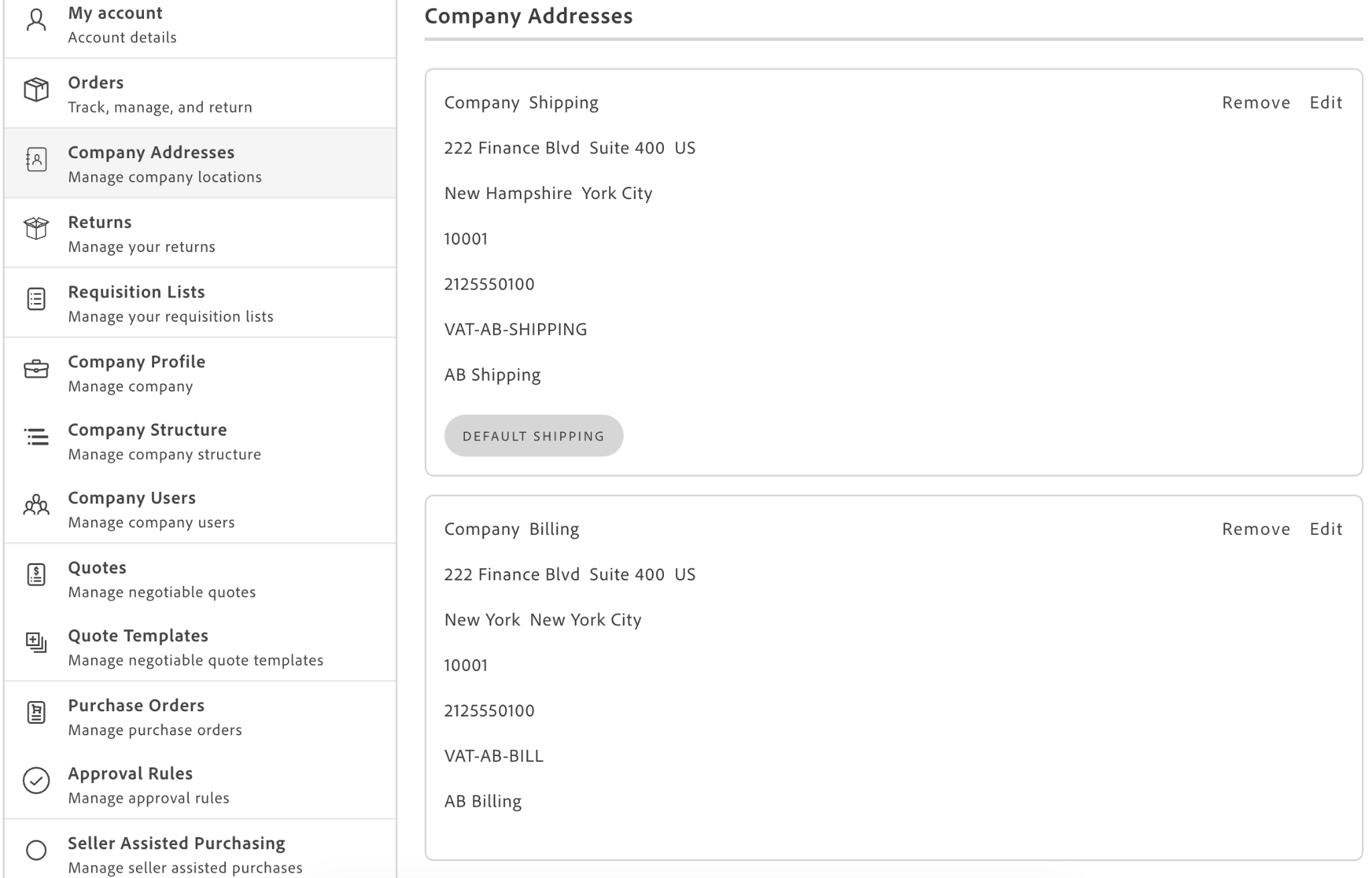
The Company Address Book feature lets a company share one address book across company users. Buyers can then select those shared addresses during checkout.
How the feature is delivered
Section titled “How the feature is delivered”The feature spans multiple components:
| Area | Component | What it controls |
|---|---|---|
| Company Management | CompanyProfile container | Company-level settings that enable shared addresses and optional one-time shipping addresses. |
| User Account | Addresses container | Buyer view and management of addresses when company address book is enabled. |
| Checkout | Validate a shipping address | Checkout address behavior when buyers choose a saved address or enter a one-time shipping address. |
The Company Address Book feature is intended for organizations where addresses belong to the business rather than to individual buyers, such as warehouses, branch offices, and legal billing addresses.
Core settings
Section titled “Core settings”Two company-level configuration settings control Company Address Book behavior. The backend stores them, the drop-ins read them at runtime, and you change them through the CompanyProfile container or in the Admin panel. They are not props you pass to a container.
| Setting | Field name exposed by the drop-in | Behavior |
|---|---|---|
address_book_enabled | addressBookEnabled in Account and Company Management | Switches address management from personal addresses to company-shared addresses. |
address_book_custom_shipping_address_enabled | addressBookCustomShippingAddressEnabled in Account, customShippingAddressEnabled in Company Management | Allows or blocks one-time shipping addresses during checkout. |
Enablement flow
Section titled “Enablement flow”Use this flow to enable the feature and verify shopper behavior.
- Enable company address book in your company profile settings.
- Configure whether one-time shipping addresses are allowed.
- Confirm company roles have the address permissions your shoppers need.
- Validate shopper behavior in both Account and Checkout.
Turning the feature on has an order dependency: the Company Addresses branch appears in role permissions only after the address book is enabled.
Turning the feature off is reversible: personal and company address datasets remain separate, so personal addresses can reappear when the setting is disabled.
Architecture and runtime behavior
Section titled “Architecture and runtime behavior”Company Address Book is not a standalone container. It is a feature that changes data source and behavior in existing containers.
In Account, the Addresses container switches to company address data only when all three conditions are true:
- The
b2bEnabledprop is true. - The shopper is resolved as a company customer.
- The active company has address book enabled.
This design lets a storefront pass one B2B-capable setup and have the container resolve the active mode.
Event communication
Section titled “Event communication”The feature defines no events of its own. It relies on events from neighboring drop-ins.
| Event | Source | Behavior to account for |
|---|---|---|
auth/permissions | Auth drop-in | Payload is the customer’s resolved ACL permissions, including the company address permissions, used by storefront navigation to decide which account entries to render. It is the drop-in’s own cached object, replayed by reference, so consumers must copy it before adding or overriding keys. |
companyContext/changed | Company Switcher drop-in | Payload is the active company id, or null. The Account drop-in does not subscribe to it for addresses, so a company switch does not by itself re-resolve the address book. |
company/updated | Company Management drop-in | Emitted after a successful profile or configuration save. Payload is a wrapper object, { company }, not the company itself. Lets a storefront react to a change of the two settings without polling. |
error | Account drop-in | Emitted only on a network-level failure, when the request itself rejects, with payload { source, type, error } where source is the literal 'auth'. A GraphQL error such as a permission denial is thrown rather than emitted here, and getCompanyAddressBookConfig swallows failures silently. |
Data access model
Section titled “Data access model”The feature exposes two key read patterns:
getCompanyAddressBookConfig: returns only the two settings, without the address list. It never throws; any failure resolves to both settingsfalse. Use it when you only need to know whether the address book is on, such as navigation, page titles, and feature gates.getCompanyAddressBook: returns the two settings together with the address list in one request. It throws on network and GraphQL errors, apart from a missing company default address, which it tolerates. Use it when you also need the addresses, such as a checkout gate that counts shipping and billing addresses.
Write operations are separate from personal-address writes and include createCompanyAddress, updateCompanyAddress, deleteCompanyAddress, and setDefaultCompanyAddress.
Both reads are issued as GraphQL GET requests, so their operation names travel in the URL. One name is a prefix of the other (GET_COMPANY_ADDRESS_BOOK and GET_COMPANY_ADDRESS_BOOK_CONFIG), so a prefix filter matches both.
Permission model
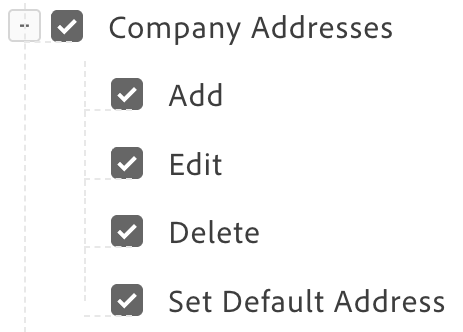
Section titled “Permission model”Address Book actions map to explicit permissions surfaced by the Account drop-in constant COMPANY_ADDRESS_PERMISSIONS.
| Permission intent | User experience |
|---|---|
| View | Allows seeing company addresses in account/selection flows. |
| Add | Allows creating a company-owned address. |
| Edit | Allows editing an existing company-owned address. |
| Delete | Allows removing an address from the company book. |
| Set default | Allows assigning default shipping/billing addresses. |
Primary permission resources are:
Magento_CompanyAddressStorefrontCompatibility::company_addressMagento_CompanyAddressStorefrontCompatibility::addMagento_CompanyAddressStorefrontCompatibility::editMagento_CompanyAddressStorefrontCompatibility::deleteMagento_CompanyAddressStorefrontCompatibility::default
Legacy aliases can still be accepted by compatibility resolution, but new integrations should use the COMPANY_ADDRESS_PERMISSIONS constant instead of hardcoded legacy strings.
A Company Administrator is granted every one of these permissions before the checks run, so it always holds full access. The role is recognized by an id of 0 or MA==, or by the name Company Administrator, so a custom role carrying that name unlocks the same access.
The container resolves permissions itself, per instance, with its own role query. It does not consume the auth/permissions event, so two Addresses instances on one page issue two role queries. Permissions are enforced in the address book context only. In the checkout context the container does not gate the UI on them, because address selection there is part of placing an order rather than managing the book. Two reads still apply at checkout: deletion still requires the delete permission, and the absence of the create permission is what keeps a typed checkout address one-time.
Company context and scoping
Section titled “Company context and scoping”Address Book data is scoped to the active company, held in session storage under DROPIN__COMPANYSWITCHER__COMPANY__CONTEXT and sent as the X-Adobe-Company request header. Any cache of the address book configuration that outlives a single page must therefore be keyed on the active company, or a company switch serves the previous company’s answer. Caching per page load is safe where a navigation is a full page reload.
Checkout behavior
Section titled “Checkout behavior”With Company Address Book enabled, billing and shipping are gated differently:
- Billing always requires a saved company billing address. Without one, the order cannot be placed.
- Shipping requires a saved company shipping address only when custom shipping is disabled. With custom shipping enabled, a buyer can place the order with no saved shipping address by entering a one-time one.
Because the two rules differ, evaluate shipping and billing separately when you gate the Place Order button.
import { getCompanyAddressBook } from '@dropins/storefront-account/api.js';
const book = await getCompanyAddressBook();const items = book?.addresses?.items ?? [];
const hasShippingAddress = items.some((item) => item.addressType === 'SHIPPING');const hasBillingAddress = items.some((item) => item.addressType === 'BILLING');const customShippingAllowed = Boolean(book?.addressBookCustomShippingAddressEnabled);
const shippingMissing = !hasShippingAddress && !customShippingAllowed;const shouldDisablePlaceOrder = Boolean(book?.addressBookEnabled) && (shippingMissing || !hasBillingAddress);The !customShippingAllowed check is an escape clause that only hasShippingAddress needs. hasBillingAddress has no equivalent, because a billing-only selection is always locked to saved company addresses regardless of the custom-shipping setting. Leave the escape clause out and the order becomes unplaceable: the one-time shipping form is offered and filled in, but the button stays disabled anyway.
Two more constraints prevent a rejected order or a silently overwritten address.
Pass isBillToShipping: false at initialization
Section titled “Pass isBillToShipping: false at initialization”When the bill-to-shipping checkbox is hidden for B2B customers, the Checkout drop-in keeps its built-in default of true and routes the shipping address through the billing mutation with same_as_shipping: true. The backend rejects that once custom shipping addresses are allowed. Pass isBillToShipping: false as an initialize-time default for companies running an address book. Because this default applies at initialization, resolve the address book answer before you mount the Checkout drop-in.
Select billing before one-time shipping
Section titled “Select billing before one-time shipping”Select the billing address before the buyer enters a one-time shipping address. A one-time address has no id, so a consumer that derives its selection ID from the cart resolves it to 0. Any later cart update re-runs the selection effect, falls back to the default company address, and silently replaces what the buyer typed. Selecting billing is such an update, so do it first.
Guarding account access
Section titled “Guarding account access”A company user without the view permission should neither see an address entry in the account navigation nor reach the address page by URL. The container does neither: with the book on and no view permission it returns an empty list, so the page still renders, titled and empty. Hiding the navigation entry and guarding the route are the storefront’s own work.
- Hide address-related navigation entry points.
- Protect direct URL access with route guards.
- Skip the redirect for an address summary rendered on the account page itself. The account page is the natural redirect target, so an unguarded redirect there sends the page to itself and it reloads forever.
Extensibility notes
Section titled “Extensibility notes”The feature adds no new slot family. It reuses existing Addresses and CompanyProfile slot extension points. If you override CompanyData, your slot content replaces the Address Book Configuration block, so custom slot implementations preserve required configuration visibility.
Addresses container
Section titled “Addresses container”The sections above describe the feature as a whole. The rest of this page documents the two containers it changes, starting with the buyer-facing one.
The Addresses container from the Account drop-in (@dropins/storefront-account) is the buyer-facing surface for the feature. Only the behavior that the company address book changes is described here. Everything else behaves as documented on the Addresses container page.
What changes when the book is enabled
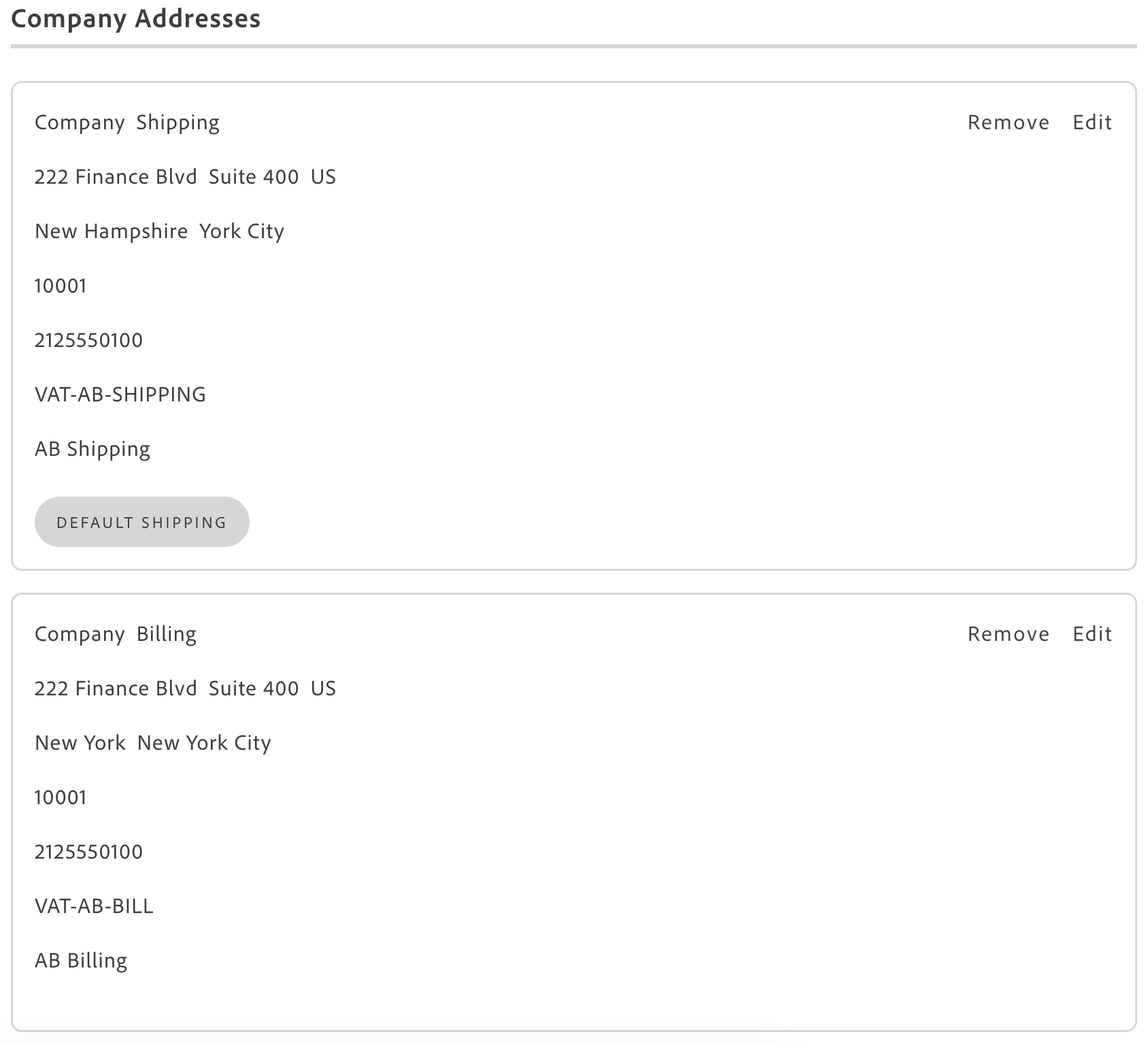
Section titled “What changes when the book is enabled”- The dataset changes. The container fetches the company address book instead of the customer’s personal addresses, in a single request that also returns the two settings. If that request fails or access is denied, it falls back to the personal-address flow rather than rendering an error.
- The heading changes. A storefront is expected to title the page Company Addresses rather than Addresses, based on the setting and the view permission together.
- The default tags change. On the company card they read DEFAULT SHIPPING and DEFAULT BILLING. A personal list keeps the shorter SHIPPING and BILLING. In a selectable checkout list covering only one purpose, the tag collapses to DEFAULT.
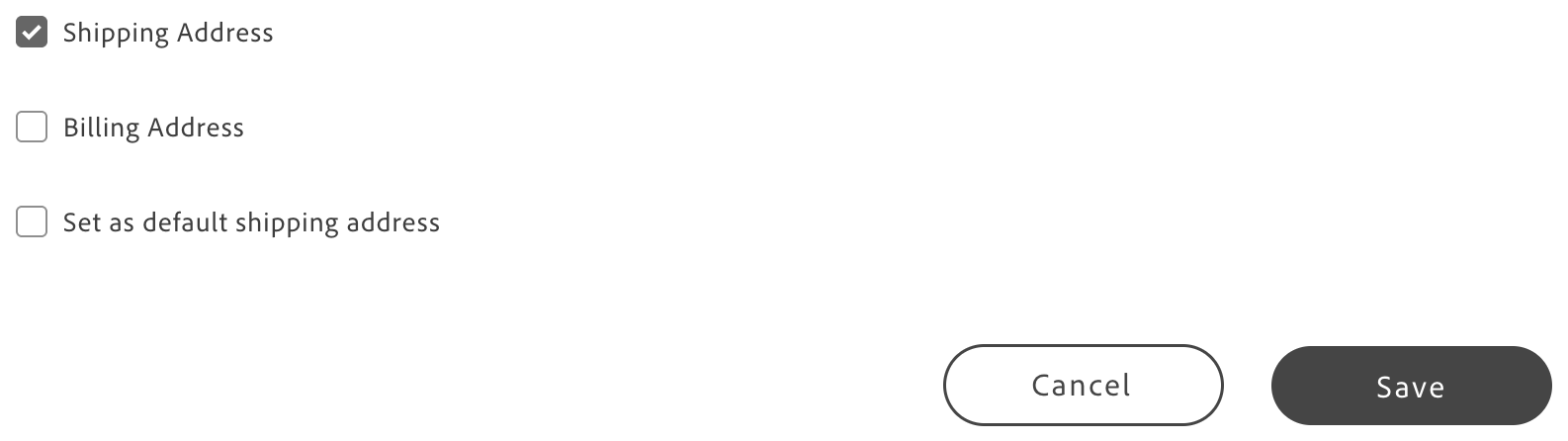
- The form changes. Instead of the two personal default checkboxes, it carries a Shipping Address and a Billing Address checkbox that fix the address type, plus a single default checkbox whose label follows the chosen type. Because a company address is either the default shipping or the default billing address, only one type can be chosen. The type checkboxes fix the address type at creation and are disabled on edit, because the type cannot be changed afterward. An address created without a type is treated as SHIPPING. The container also injects a Nickname field when the store’s attribute form does not already render one.
Actions by permission
Section titled “Actions by permission”Each action is available only with the matching ACL (access control list) permission.
| Action | Behavior without the permission |
|---|---|
| View | The address list is returned empty in the address book context. |
| Create | The customer sees a message in place of the create button. |
| Edit | Opens the address form pre-populated with the address data (edit requires the permission). |
| Delete | Removes the address (delete requires the permission). |
| Set Default | The default checkbox is rendered disabled, not removed. |
Checkout selection behavior
Section titled “Checkout selection behavior”This section covers how the container renders and filters the selectable address list. For the place-order gating rule and the billing/shipping asymmetry, see Checkout behavior.
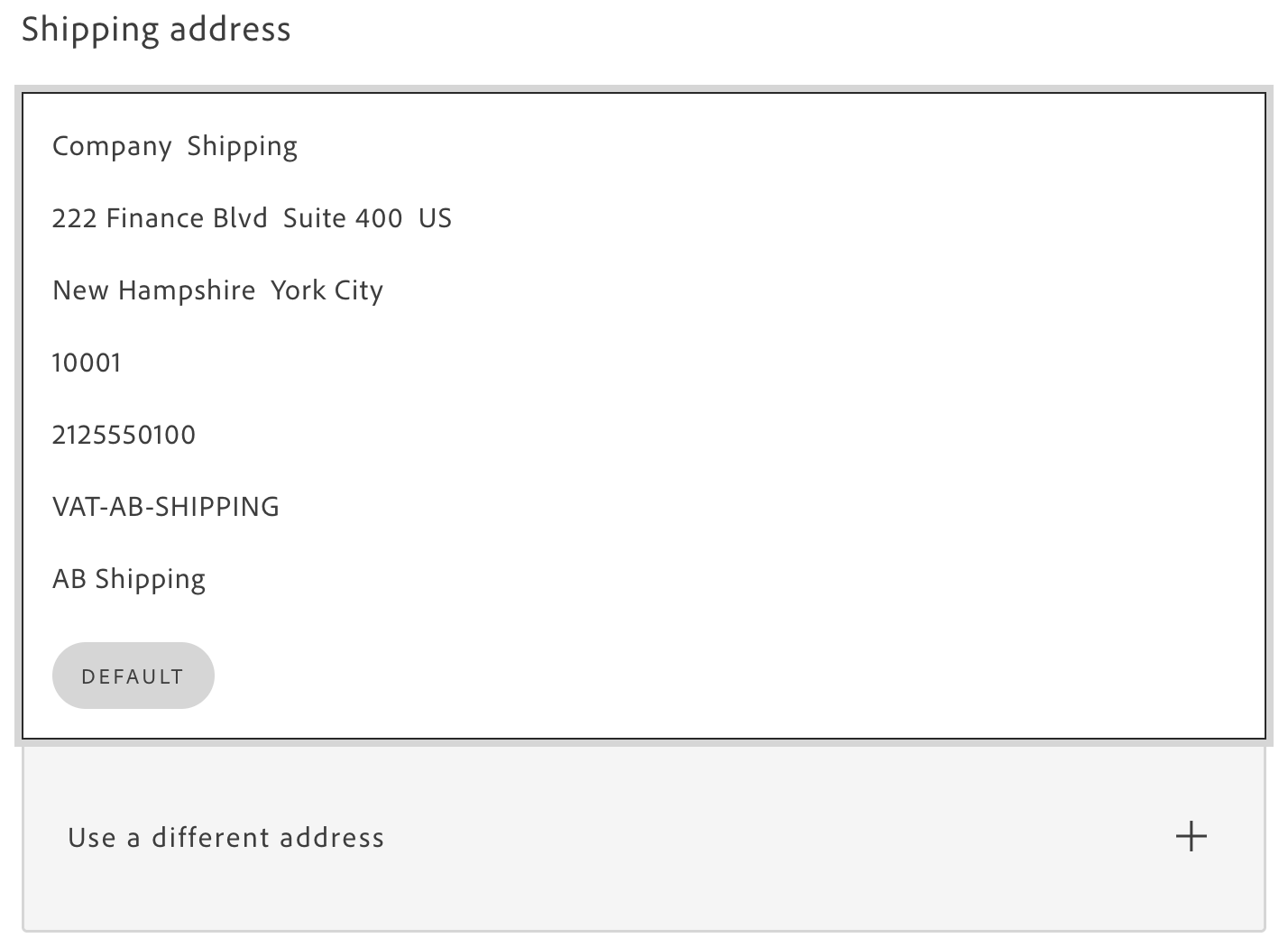
The selectable list is filtered by address type: a list marked as the shipping selection shows only SHIPPING addresses, a list marked as the billing selection only BILLING ones. A list marked as both, or as neither, is not filtered. When custom addresses are allowed and the filtered shipping list is empty, the address form is rendered open so the buyer can enter a one-time address. A billing-only list never offers it. The selected address is handed to the consumer with its id renamed to companyAddressId, so checkout sends a company address reference rather than a new address. A typed checkout address is genuinely one-time only when the buyer lacks the create permission. A buyer who holds it has the typed address saved into the company book.
Integration examples
Section titled “Integration examples”import Addresses from '@dropins/storefront-account/containers/Addresses.js';import { render as accountProvider } from '@dropins/storefront-account/render.js';
// Company address book, full management view on the account addresses pageaccountProvider.render(Addresses, { title: 'Company Addresses', b2bEnabled: true, minifiedView: false, withActionsInFullSizeView: true, routeAddressesPage: () => rootLink('/customer/address'),})(addressesContainer);
// Summary view on the account overview page, without actionsaccountProvider.render(Addresses, { title: 'Company Addresses', b2bEnabled: true, minifiedView: true, withActionsInMinifiedView: false, routeAddressesPage: () => rootLink('/customer/address'),})(addressesSummaryContainer);
// Checkout, shipping address selection with a one-time address formaccountProvider.render(Addresses, { title: placeholders?.Checkout?.Addresses?.shippingAddressTitle, b2bEnabled: true, minifiedView: false, selectable: true, selectShipping: true, showSaveCheckBox: true, showShippingCheckBox: false, showBillingCheckBox: false, hideActionFormButtons: true, formName: 'selectedShippingAddress', fieldIdPrefix: 'shipping', forwardFormRef: shippingFormRef, inputsDefaultValueSet: cartShippingAddress, defaultSelectAddressId: shippingAddressId, onAddressData: ({ data, isDataValid }) => { if (!isDataValid) return; // data carries companyAddressId for a saved company address, // or the typed address fields for a one-time one setShippingAddressOnCart({ data, isDataValid }); },})(shippingAddressContainer);
// Checkout, billing address selection, always locked to saved company addressesaccountProvider.render(Addresses, { title: placeholders?.Checkout?.Addresses?.billingAddressTitle, b2bEnabled: true, minifiedView: false, selectable: true, selectBilling: true, showSaveCheckBox: false, showShippingCheckBox: false, showBillingCheckBox: false, hideActionFormButtons: true, formName: 'selectedBillingAddress', forwardFormRef: billingFormRef, inputsDefaultValueSet: cartBillingAddress, defaultSelectAddressId: billingAddressId, onAddressData: ({ data, isDataValid }) => { if (!isDataValid) return; setBillingAddressOnCart({ data, isDataValid }); },})(billingAddressContainer);Properties changed by the feature
Section titled “Properties changed by the feature”Only the properties whose behavior the company address book changes are listed here. The container’s remaining properties are unaffected by the feature and are documented on the Addresses container page.
| Prop | Type | Default | Behavior with the feature |
|---|---|---|---|
b2bEnabled | boolean | false | Opts the container into the company address book flow. Not sufficient on its own: the container also resolves the customer type and reads the company setting. Pass it unconditionally, because a B2C customer keeps the personal flow regardless. |
contextMode | 'addressBook' | 'checkout' | Derived | Decides whether company address permissions are enforced. When omitted it is derived from selectable, becoming checkout when selectable is set and addressBook when it is not, which is why most integrations never pass it. Use addressBook on the account addresses page (permissions enforced) and checkout in the checkout flow (not enforced). |
title | string | — | With the address book on, this is what makes the page read Company Addresses. Decide the value from the company setting and the view permission together, not from either alone. |
selectShipping | boolean | false | In the company flow it additionally filters the list to SHIPPING addresses. Expect an empty list when the book holds only billing addresses, and the one-time form in its place when custom addresses are allowed. |
selectBilling | boolean | false | In the company flow it additionally filters the list to BILLING addresses. Selection stays locked to saved company addresses, because a billing-only list never offers the one-time form. Setting both selectShipping and selectBilling, or neither, disables the filter. |
defaultSelectAddressId | number | string | — | Behaves as documented, with one hazard: do not derive it as 0 from a one-time address, which has no id, or the default company address is silently re-selected over what was typed. Select the billing address before the buyer enters a one-time shipping address, because selecting billing re-runs the selection effect. See Select billing before one-time shipping. |
onAddressData | (values) => void | — | In the company flow the payload’s id is renamed to companyAddressId for a saved company address. Send companyAddressId as a company address reference when present, and the address fields when it is not. |
showSaveCheckBox | boolean | false | In a B2B checkout instance the checkbox is suppressed regardless of this value. Do not rely on it to keep a company address one-time: only the absence of the create permission does that. |
Admin configuration
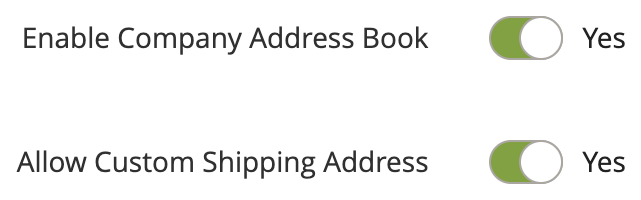
Section titled “Admin configuration”The Company (B2B) feature must be enabled at store level, and the address book must be enabled on the company itself. The two company settings can be managed from the storefront through the CompanyProfile container or in the Admin panel.
| Scope | Admin path |
|---|---|
| Store level | Stores > Settings > Configuration > General > B2B Features > Enable Company |
| Company level | Customers > Companies > Edit Company > Advanced Settings > Enable Company Address Book |
| Company level | Customers > Companies > Edit Company > Advanced Settings > Allow Custom Shipping Address |
CompanyProfile container
Section titled “CompanyProfile container”The CompanyProfile container from the Company Management drop-in (@dropins/storefront-company-management) is where an administrator turns the feature on. Only the behavior the company address book changes is described here. Everything else behaves as documented on the CompanyProfile container page.
What changes when the book is enabled
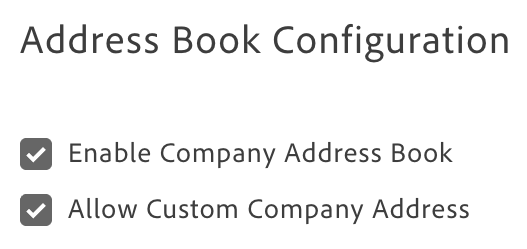
Section titled “What changes when the book is enabled”The feature adds an Address Book Configuration section to the company profile, on the read-only card and in the edit form alike.
- On the card, both settings show as Enabled or Disabled: Enable Company Address Book and Allow Custom Company Address. The value is rendered with a plain truthiness check, so a missing value is indistinguishable from an explicit false.
- In the edit form, the same two settings render as checkboxes, positioned between the account fields and the legal address. The Edit action does not replace the card. The form is added below it.
- The section is visible only to a Company Administrator, on the card and in the form alike. It is gated on the administrator role itself rather than on any ACL permission, and the two configuration fields are not requested from the backend for other users.

Submitting the form persists the settings through the updateCompanyConfig mutation, which accepts addressBookEnabled and customShippingAddressEnabled as a partial payload. In practice the form always writes both settings, so the mutation runs on every administrator save, even when neither checkbox has changed. Both settings apply to every user in the company.
The profile and configuration are updated separately and sequentially: the profile update runs first, followed by the configuration update only if the profile update succeeds. Each write first reads the customer’s role, making a full administrator save four round trips.
updateCompanyConfig returns the updated company model, where the settings are exposed as the camelCase fields addressBookEnabled and customShippingAddressEnabled. Although the raw GraphQL response contains the corresponding snake_case fields under company.config, that is not the shape the function returns.
Integration example
Section titled “Integration example”import { CompanyProfile } from '@dropins/storefront-company-management/containers/CompanyProfile.js';import { render as companyProvider } from '@dropins/storefront-company-management/render.js';
// Basic integration - the Address Book Configuration section is rendered for administratorscompanyProvider.render(CompanyProfile, {})(companyProfileContainer);Slot consequence
Section titled “Slot consequence”The container’s properties are unchanged by the feature. One slot carries a consequence worth stating here.
| Slot | Context | Consequence |
|---|---|---|
slots.CompanyData | { companyData, Default } | Supplying this slot replaces the whole card body, so the Address Book Configuration block disappears with it. companyData carries the account rows only and does not include the two settings. |
Admin configuration
Section titled “Admin configuration”The Company (B2B) feature must be enabled at store level. The two settings this container edits are the company-level ones listed under the Addresses container’s Admin configuration.
| Scope | Admin path |
|---|---|
| Store level | Stores > Settings > Configuration > General > B2B Features > Enable Company |
Implementation checklist
Section titled “Implementation checklist”Use this checklist before release:
- Confirm company settings are exposed in your Company Management experience.
- Verify role permissions for view/add/edit/delete/default.
- Test with at least two companies to validate context switching.
- Test checkout combinations:
- Saved billing + saved shipping.
- Saved billing + one-time shipping (when enabled).
- Missing required default addresses.
- Test non-company shoppers to confirm personal-address behavior is unchanged.
- Verify fallback behavior under network/API error paths.