
CompanyHierarchy Container
Part of the storefront-company-management drop-in. Displays and manages the company organizational hierarchy for company administrators, with an interactive tree view that supports drag-and-drop reorganization of parent-child company relationships. The hierarchy supports only a single-level structure: parent companies and their direct children. Nested hierarchies are not supported.
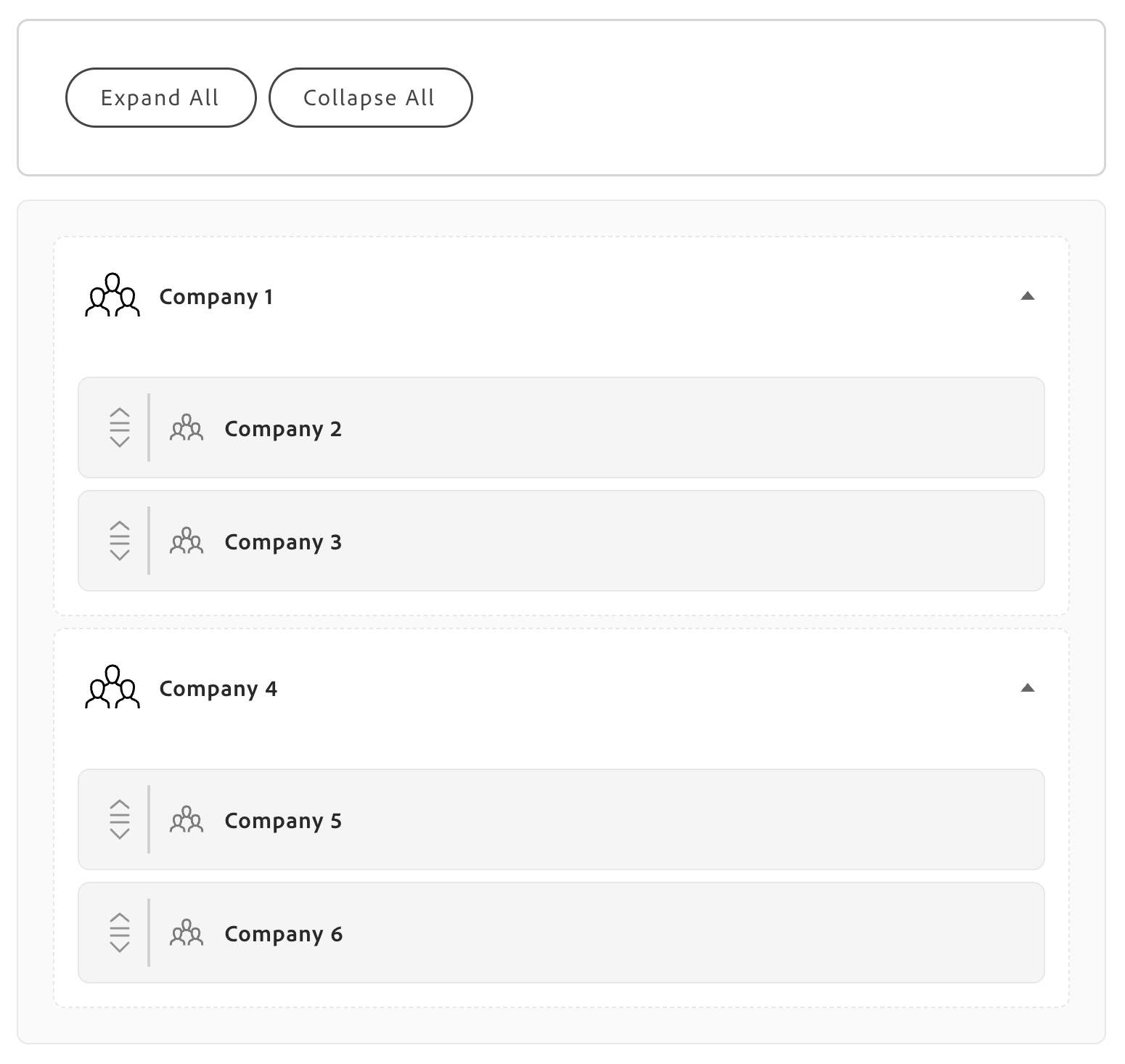
The following shows the tree view rendered in SHOW_STRUCTURE mode.
View modes
Section titled “View modes”The container renders one of five view modes depending on data state and user permissions.
| Mode | When it appears |
|---|---|
IS_LOADING | During the initial admin check and data fetch |
NO_ACCESS | When the authenticated user lacks Company Administrator privileges |
IS_EMPTY | When no companies exist in the hierarchy |
IS_ERROR | When an API call fails or a network error occurs |
SHOW_STRUCTURE | When data loads successfully, rendering the full interactive tree |
Displayed information
Section titled “Displayed information”When the container renders in SHOW_STRUCTURE mode, the tree view includes:
- Company names in a hierarchical tree structure
- Visual distinction between root companies (no parent) and child companies nested under a parent
- Optional “Admin” badges next to companies where
is_administrue(controlled byshowAdminBadge) - Drag handles on child companies for reorganizing the structure
- Expand and collapse indicators for companies that have children
- Company icons that distinguish root-level entries (full opacity) from child-level entries
- Selection highlighting with a blue border on the clicked company row
- A toolbar with Expand All and Collapse All action buttons
Available actions
Section titled “Available actions”| Action | How to trigger |
|---|---|
| Expand or collapse a single node | Click the chevron icon on a company row |
| Expand all nodes | Click the Expand All toolbar button |
| Collapse all nodes | Click the Collapse All toolbar button (all nodes collapse except the virtual root) |
| Select a company | Click any company row |
| Drag a company | Drag a child company row to a new position in the tree |
| Drop a company | Drop a dragged company onto a root-level company or the virtual root to reassign the relationship |
| Auto-refresh | Triggered automatically after a successful assign or unassign operation |
GraphQL operations
Section titled “GraphQL operations”The container orchestrates the following operations automatically.
| Operation | Type | Description |
|---|---|---|
isCompanyAdmin | Query | Validates that the authenticated user has Company Administrator role. The check passes when role.id === '0' or role.name === 'Company Administrator'. |
getCompanyHierarchy | Query | Fetches the complete hierarchy including parent-child relationships via the customer.company_hierarchy field. |
assignChildCompany | Mutation | Assigns a child company to a parent company. |
unassignChildCompany | Mutation | Removes a child company from its parent, making it a root-level company. |
Configuration
Section titled “Configuration”The CompanyHierarchy container provides the following configuration options:
| Parameter | Type | Req? | Description |
|---|---|---|---|
withHeader | boolean | No | Renders a “Company Hierarchy” title and divider above the tree. Set to true for standalone page sections; leave false (default) when the surrounding layout already provides a title. Use true for full-page company management dashboards; use false for sidebar widgets or embedded views. |
className | string | No | Adds a custom CSS class to the root container element, merged with the default account-company-hierarchy class. Use to apply brand styles, integrate with a utility CSS framework (Tailwind, Bootstrap, etc.), add responsive layout classes for mobile or tablet layouts, or override default spacing, colors, or typography. |
defaultExpanded | boolean | No | Controls whether all tree nodes are expanded on first render. Defaults to true. Use true for small hierarchies (fewer than 10 companies) where immediate full visibility helps; use false for large hierarchies (20 or more companies) to reduce visual overload, or for progressive disclosure in compact or mobile layouts. |
showAdminBadge | boolean | No | Shows an “Admin” badge next to companies where the authenticated user has admin privileges (is_admin: true). Defaults to false. Enable in multi-company environments where users manage more than one organization, or in company selection interfaces where quick visual identification of administrative access rights is important. Disable for single-company users or when permissions are irrelevant to the task. |
slots | object | No | Replaces or extends the default toolbar above the tree. Use to swap in custom-styled Expand All / Collapse All controls, add extra actions (such as Export to PDF, Print Structure, or Share Hierarchy), implement filtering or search above the tree, display company count badges or hierarchy statistics, or integrate analytics tracking for expand and collapse events. See Slots for context properties. |
The CompanyHierarchy container exposes one slot for customizing the toolbar.
| Slot | Type | Required | Description |
|---|---|---|---|
Actions | SlotProps<HierarchyActionsContext> | No | Replaces the default “Expand All” / “Collapse All” toolbar buttons. Receives context with tree controls and state. |
Actions slot context
Section titled “Actions slot context”The Actions slot receives a context object with the following properties:
| Property | Type | Description |
|---|---|---|
expandAll | () => void | Expands all tree nodes. |
collapseAll | () => void | Collapses all nodes except the virtual root. |
expandedIds | Set<string> | The set of currently expanded node IDs. |
setExpandedIds | (ids: Set<string>) => void | Sets the expanded nodes programmatically. |
treeItemsCount | number | Total number of companies in the hierarchy. |
The following examples show common ways to render the CompanyHierarchy container.
import { render as provider } from '@dropins/storefront-company-management/render.js';import { CompanyHierarchy } from '@dropins/storefront-company-management/containers/CompanyHierarchy.js';
await provider.render(CompanyHierarchy, {})(block);With header
Section titled “With header”import { render as provider } from '@dropins/storefront-company-management/render.js';import { CompanyHierarchy } from '@dropins/storefront-company-management/containers/CompanyHierarchy.js';
await provider.render(CompanyHierarchy, { withHeader: true,})(block);With header and admin badges
Section titled “With header and admin badges”import { render as provider } from '@dropins/storefront-company-management/render.js';import { CompanyHierarchy } from '@dropins/storefront-company-management/containers/CompanyHierarchy.js';
await provider.render(CompanyHierarchy, { withHeader: true, defaultExpanded: false, showAdminBadge: true,})(block);With a custom Actions slot
Section titled “With a custom Actions slot”import { render as provider } from '@dropins/storefront-company-management/render.js';import { CompanyHierarchy } from '@dropins/storefront-company-management/containers/CompanyHierarchy.js';import { Button } from '@adobe-commerce/elsie/components';
await provider.render(CompanyHierarchy, { className: 'custom-hierarchy-styling', withHeader: true, defaultExpanded: true, showAdminBadge: true, slots: { Actions: ({ expandAll, collapseAll, treeItemsCount }) => ( <div className="custom-actions"> <Button onClick={expandAll}>Open All ({treeItemsCount})</Button> <Button onClick={collapseAll}>Close All</Button> <Button>Export Structure</Button> </div> ), },})(block);Admin configuration
Section titled “Admin configuration”The CompanyHierarchy container has no dedicated Admin panel settings of its own, but the following configurations must be in place for it to function.
Store settings
Section titled “Store settings”Path: Admin > Stores > Settings > Configuration > General > B2B Features > Company
| Setting | Required value |
|---|---|
| Enable Company | Yes |
| Enable Company Registration from the Storefront | Yes |
Company settings
Section titled “Company settings”Path: Admin > Customers > Companies > Edit Company > Advanced Settings
- The parent company must exist and have Active status.
- Each child company must have a valid company record before it can be assigned to a parent.
Permissions
Section titled “Permissions”There are no dedicated ACL resources that control access to Company Hierarchy. Access is determined entirely by the Company Administrator role check performed via the isCompanyAdmin() API. Non-admin users see the access-denied view regardless of Admin panel settings.