
StoredCards Container
The StoredCards container renders a Stored payment methods section with one radio row per vaulted card (brand, masked number, expiry) and an optional Pay with a new card option. The host checkout block handles loading tokens, syncing the cart when a card is selected, and mounting the CreditCard form when the shopper chooses a new card. See Vaulted cards at checkout.
Checkout appearance
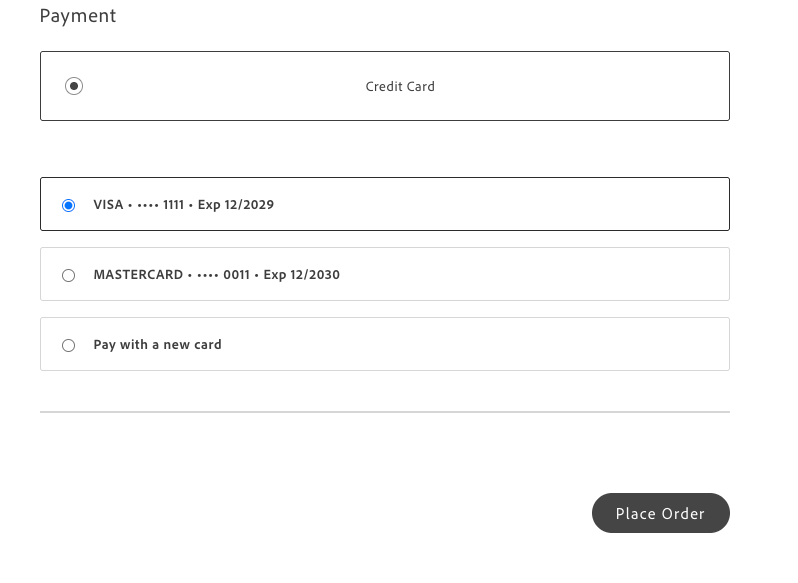
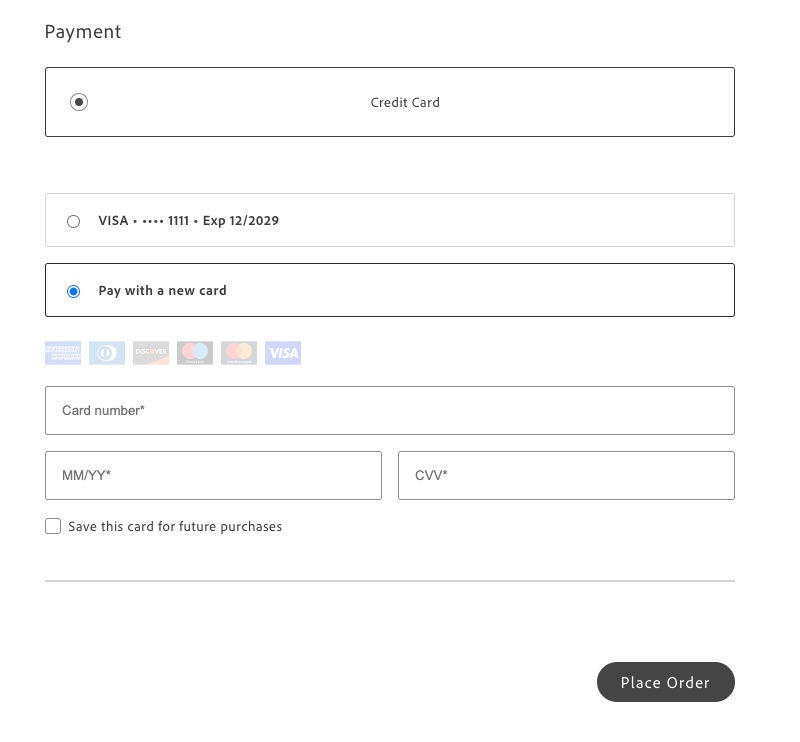
Section titled “Checkout appearance”The screenshots below show the Payment section when Credit card is selected and vaulted cards are available—showing the same flows described in the Vaulted cards at checkout tutorial.
Saved card selected
Section titled “Saved card selected”The shopper selects a vaulted card. The host typically syncs the selected token to the cart and does not mount the hosted card form.
Pay with a new card
Section titled “Pay with a new card”The shopper selects Pay with a new card. The host mounts the CreditCard form in the same checkout section.
Configuration
Section titled “Configuration”The StoredCards container accepts standard fieldset HTML attributes plus:
| Parameter | Type | Req? | Description |
|---|---|---|---|
cards | StoredCard[] | Yes | Vault rows to display. Each StoredCard includes publicHash and optional brand, maskedNumber, expiry, holderName. |
onPaymentChoice | function | No | Called when the shopper selects a saved card or Pay with a new card. Payload is { kind: 'vault', card } or { kind: 'new' }. |
payWithNewCardLabel | string | No | When set, renders an extra radio row after stored cards (for example, Pay with a new card). |
selectedChoice | object | null | No | Controlled selection: { kind: 'new' } or { kind: 'vault', publicHash: string }. |
This container does not expose any customizable slots.
import { StoredCards } from '@dropins/storefront-payment-services/containers/StoredCards.js';import { render as provider } from '@dropins/storefront-payment-services/render.js';
await provider.render(StoredCards, { cards: [/* mapped from vault tokens */], payWithNewCardLabel: 'Pay with a new card', onPaymentChoice: (choice) => { /* sync cart, mount or hide CreditCard */ },})(document.getElementById('stored-cards'));For end-to-end wiring (tokens, syncVaultToCart, place order), use the vault helpers and the Vaulted cards at checkout tutorial.