
Container slots
Using slotsAn extension point inside a drop-in where custom UI or behavior can be added, replaced, or removed. provides the deepest level of customization for drop-in components. A slot provides a place in a drop-in containerA pre-built UI module that renders drop-in functionality and manages logic, state, and data for a feature. to add your own UI components and functions. This architecture makes it easy to change the default look, layout, and behavior. Let’s learn how slots work.
Big Picture
Section titled “Big Picture”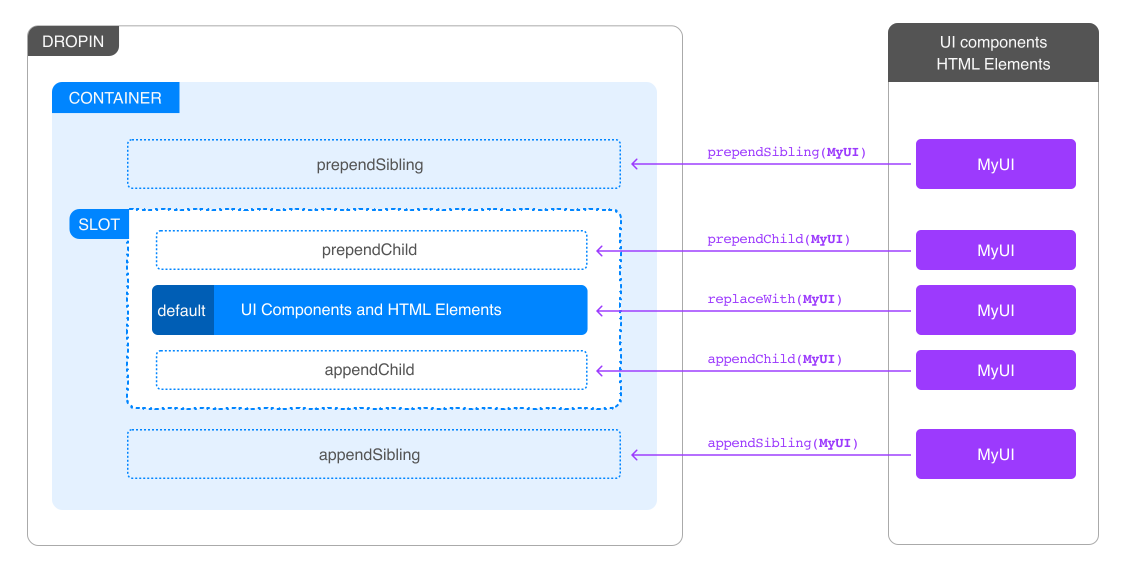
The following functions are available to all slots:
prependSibling: Prepends a new HTML element before the content of the slot.prependChild: Prepends a new HTML element to the content of the slot.replaceWith: Replaces the content of the slot with a new HTML element.appendChild: Appends a new HTML element to the content of the slot.appendSibling: Appends a new HTML element after the content of the slot.remove: Removes the slot from the DOM.getSlotElement: Gets a slot element.onChange: Listens to changes in the context of the slot.dictionary: Provides a JSON Object for the current locale. If the locale changes, thedictionaryvalues change to reflect the values for the selected language.
Best practice for dynamic slot content
Section titled “Best practice for dynamic slot content”Do not use context methods inside other context methods. Context methods include appendChild(), prependChild(), replaceWith(), appendSibling(), prependSibling(), remove(), getSlotElement(), and onChange().
Instead, create and append wrapper elements on mount, then update their content inside callbacks using standard DOM methods like innerHTML:
slots: { MySlot: (ctx) => { const wrapper = document.createElement('div');
// Use context method on mount (outside other context methods) ctx.appendChild(wrapper);
// Update content inside onChange using standard DOM methods ctx.onChange((next) => { if (next.data.condition) { wrapper.innerHTML = 'Content A'; } else { wrapper.innerHTML = 'Content B'; } }); }}// ❌ Incorrect: Calling context method inside context methodctx.onChange((next) => { const element = document.createElement('div'); ctx.appendChild(element); // Incorrect - context method inside context method});Related resources
Section titled “Related resources”- Extending drop-in components - Advanced customization techniques
- Cart drop-in - Cart drop-in documentation
- Recommendations drop-in - Recommendations drop-in documentation