
Install the Commerce Picker
The Commerce Picker is an extension that lets you select products, categories, and product variants from your catalog and insert them into your content. It provides a visual interface for browsing and selecting commerce items in your authoring environment.
Installing the Commerce Picker
Section titled “Installing the Commerce Picker”The Commerce Picker can be installed for both the Universal Editor and the Document Authoring tool. Choose the installation method based on your authoring environment.
For the Universal Editor
Section titled “For the Universal Editor”Go to the Universal Editor Product Picker documentation and complete the setup process.
For the Document Authoring Tool
Section titled “For the Document Authoring Tool”-
Access your storefront configuration: Navigate to your storefront’s configuration in Document Authoring by either:
- Clicking the gear icon in the DA.live browser interface
- Opening directly:
https://da.live/config#/<your-org>/<your-site>/
-
Navigate to the Library tab: Click the Library tab in the configuration interface.
-
Add the Commerce Picker configuration: Add a new row with the following values:
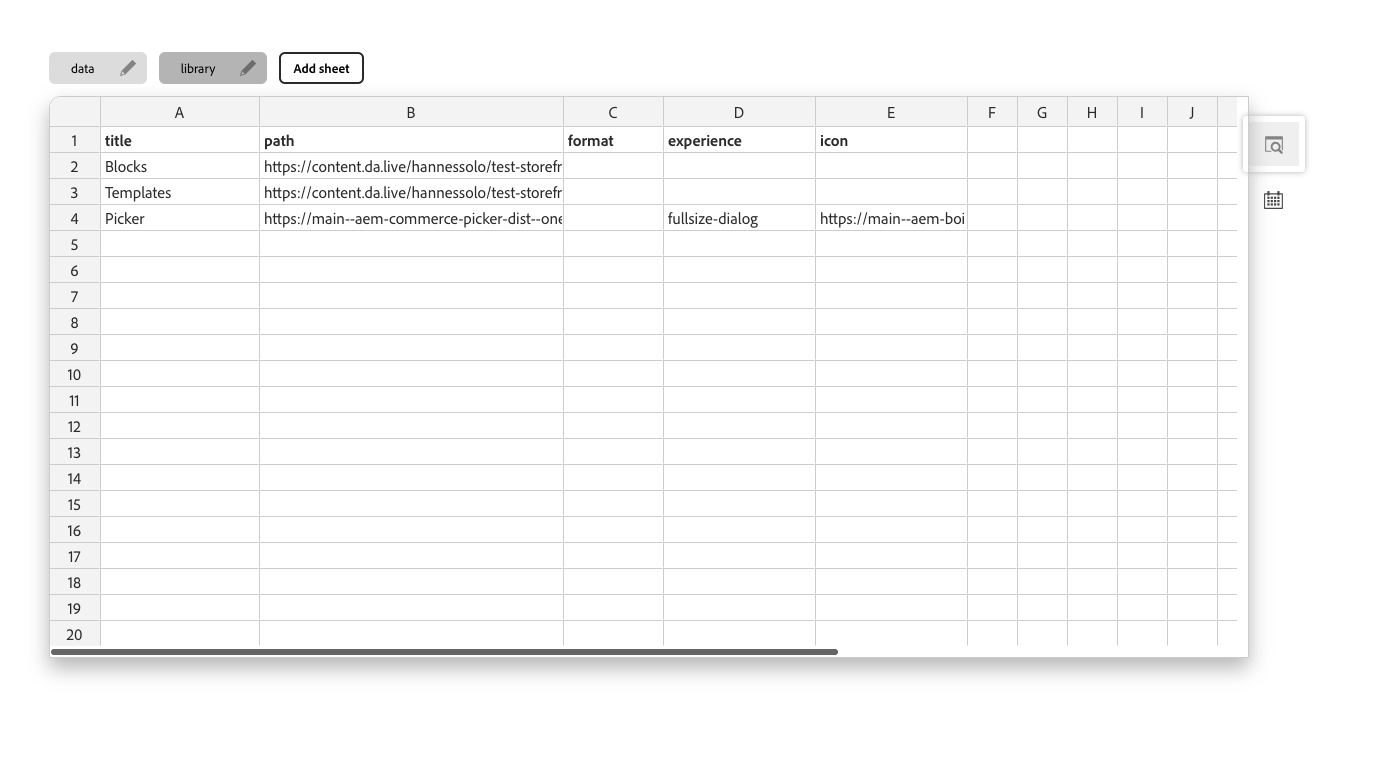 Commerce Picker Configuration
Field Value Title Commerce Picker Path https://main--aem-commerce-picker-dist--oneadobe.aem.page/dist/dist/document-authoring.html?configs-path=/config.jsonExperience fullsize-dialog Icon https://main--aem-boilerplate-commerce--hlxsites.aem.page/icons/cart.svg -
Update your project configuration: Modify your project’s
config.jsonfile to set your root category ID under"plugins.picker.rootCategory". Refer to the demo configuration for an example.