
Learn the Storefront architecture
This overview guides you to the right resources for building headless Adobe Commerce storefronts with Edge Delivery Services.
Big picture
Section titled “Big picture”Headless Adobe Commerce storefronts on Edge Delivery Services are built using a composable architecture with domain-driven commerce components called drop-in components. This architecture allows you to build and deploy a storefront that is composed of multiple Adobe services, each with its own responsibility. Drop-in components are connected through APIs and can be developed, tested, and deployed independently for faster development cycles.
Drop-in components use Adobe Commerce APIs to provide data and functionality. These components are reusable across projects and integrate out-of-the-box with Edge Delivery Services through the Commerce boilerplate. Adobe Commerce storefronts on Edge Delivery Services support doc-based authoring, enabling business users to manage content without developer help.
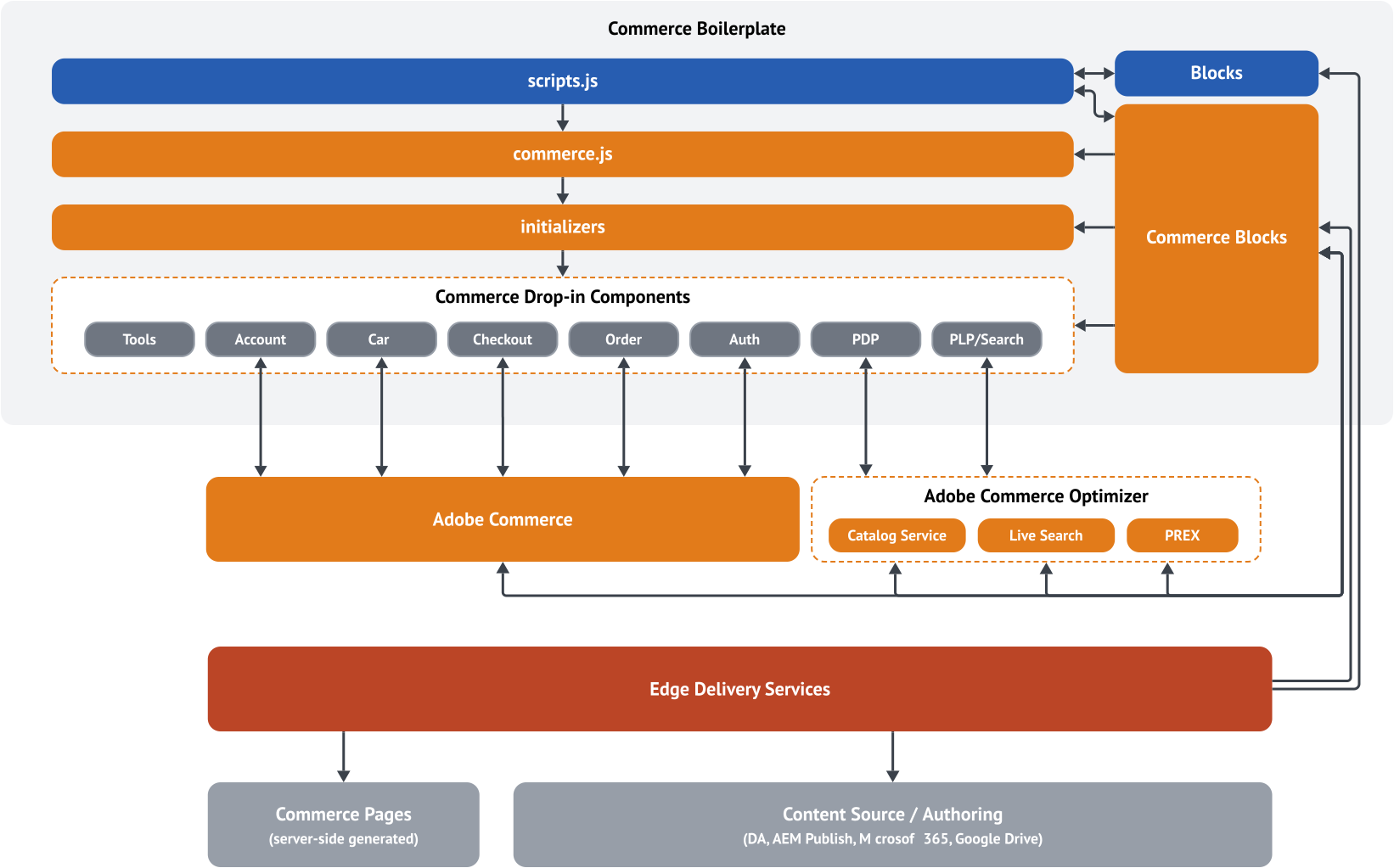
The following diagram illustrates the composable architecture of a headless Adobe Commerce storefront on Edge Delivery Services:
Storefront
Section titled “Storefront”The storefront is the front-end layer of your Adobe Commerce site. It is responsible for rendering the user interface and providing a seamless shopping experience for customers. The storefront is built using a combination of drop-in components and front-end blocks that are connected to Adobe Commerce and other services through APIs and hosted on Edge Delivery Services.
The Commerce boilerplate provides an integrated set of drop-in components that you can use to build a headless Adobe Commerce storefront on Edge Delivery Services. See the Quick Start overview for more information.
Drop-in components
Section titled “Drop-in components”Drop-in components are domain-driven commerce components that provide specific functionality for your storefront. They are designed to be reusable and can be shared across multiple projects. Drop-in components are connected to Adobe Commerce and other services through APIs and can be developed, tested, and deployed independently for faster development cycles.
You can find the integration patterns for drop-in components as pull requests in the Commerce boilerplate repository. The source code of drop-in components is private. You can add them to your project as NPM packages:
@dropins/storefront-account@dropins/storefront-auth@dropins/storefront-cart@dropins/storefront-checkout@dropins/storefront-order@dropins/storefront-payment-services@dropins/storefront-pdp@dropins/storefront-recommendations@dropins/storefront-wishlist@dropins/storefront-personalization@dropins/storefront-product-discovery
Front-end blocks
Section titled “Front-end blocks”Blocks are the fundamental parts of a page delivered by Edge Delivery Services. A block encapsulates styling and code that drives the logical components of pages.
Edge Delivery Services comes with a comprehensive library of predefined “content” and “commerce” blocks, which can be customized to meet your project needs. Code for Edge Delivery Services projects is managed in GitHub. The code is then deployed to the Edge Delivery Services platform, where it is hosted and served to end users.
Content blocks
Section titled “Content blocks”The Edge Delivery Services components that provide the content and layout for non-commerce pages on the storefront. These include Cards, Columns, Headers, Footers, and many more. See block collection for more information.
Commerce blocks
Section titled “Commerce blocks”Compared to content blocks, commerce blocks enable Adobe Commerce functionality (such as cart, checkout, and account) and can become quite complex. They are built using the same principles as content blocks but are more tightly integrated with Adobe Commerce APIs.
Using a frontend framework can help manage the complexity. In the Commerce boilerplate, you can find examples of blocks that use a buildless version of Preact and HTM. You should only use it for blocks that require complex state management with different render states. Otherwise, stick with plain JavaScript.
Use the existing blocks in the Commerce boilerplate as a reference (for example, teaser and product recommendations). If you want to use React, it’s possible, but not recommended. React is usually too heavy (size + execution) to achieve perfect Lighthouse scores.
Runtime flow
Section titled “Runtime flow”Understanding how content transforms into rendered commerce experiences helps developers know where to customize and integrate. The following diagram illustrates the complete flow from authoring to rendering:
The flow demonstrates how a simple table in a document becomes a fully functional commerce component:
- Author creates a cart page with a “Commerce Cart” table in their document.
- Edge Delivery Services transforms the document server-side into HTML with a
<div class="commerce-cart">element. - Browser loads the HTML page and client-side JavaScript decorates the blocks.
- Block decorator (
blocks/commerce-cart/commerce-cart.js) dynamically loads and initializes the Cart drop-in. - Drop-in connects to Commerce backend via API and renders the cart UI.
Adobe Commerce or Adobe Commerce as a Cloud Service
Section titled “Adobe Commerce or Adobe Commerce as a Cloud Service”Adobe Commerce or Adobe Commerce as a Cloud Service is the backend system that powers your Commerce storefront. On Adobe Commerce, you must use version 2.4.7 or later with the storefront compatibility package installed.
Adobe Commerce as a Cloud Service is the recommended deployment option for Adobe Commerce. It provides a fully managed, scalable, and secure environment for running your Commerce storefront. All product requirements and services are automatically managed and updated by Adobe.
Before starting the project, ensure that your Commerce backend meets the following requirements:
- Product license: Adobe Commerce as a Cloud Service, Cloud, or on-premises (Magento Open Source is not supported)
- Version: v2.4.7 or later
- PHP: 8.3/8.2 for Adobe Commerce 2.4.7
- Storefront services: Ensure that the latest version of following services are installed and configured:
- Data Connection service
- Services Connector
- Catalog Service
- Live Search
- Product Recommendations
Storefront Compatibility package
Section titled “Storefront Compatibility package”The Storefront Compatibility package extends the GraphQL schema provided with Adobe Commerce. It provides new mutations and adds missing fields that are needed to implement low-funnel drop-in components, such as the cart, checkout, user account, and order drop-in components.
Storefront services
Section titled “Storefront services”When connecting your storefront drop-in components to your own instance of Adobe Commerce, you must ensure that your Commmerce backend is configured with the services described here. These services are required for Commerce drop-in components to function properly.
Storefront services are a set of multi-tenant services (shared app, many users, separate data) that provide access to storefront data via GraphQL APIs. These services are very fast and are not tied to scaling constraints of a Commerce environment. They provide read-only access to catalog data, which can drive product detail and list pages, search, navigation, and product recommendations. Synchronized data is stored in a “SaaS data space” available through Adobe IMS.
Availability and setup of these services are a hard requirement for building a storefront on Edge Delivery Services because only these APIs provide the performance to build sites with a 100 Lighthouse score. The storefront services APIs are available in addition to the core Adobe Commerce GraphQL APIs.
This page provides an overview of the services required for your Adobe Commerce storefront.
Data Connection service
Section titled “Data Connection service”The Data Connection extension connects your Adobe Commerce storefront to the Adobe Experience Platform and the Edge Network so that you can enrich and personalize the shopping experience for your customers. Refer to the Data Connection Guide for details and installation instructions.
Services Connector
Section titled “Services Connector”The Services Connector connects your Commerce storefront to the Commerce backend services listed below. Refer to the Commerce Services Connector Guide for details and installation instructions.
Catalog Service
Section titled “Catalog Service”The Catalog Service module provides fast read-only access to Commerce catalog data. The product details drop-in component requires this service to render product data in the storefront. Refer to the Catalog Service Guide for details and installation instructions.
Live Search
Section titled “Live Search”The Live Search service replaces the default Commerce catalog search. This service powers the Product Discovery drop-in component, which provides a variety of customizable controls to showcase your products and build interactive experiences that engage customers.
Live Search uses events to power search algorithms such as “Most Viewed” and “Viewed This, Viewed That”. For headless implementations, learn how to set up eventing for your storefront.
Product Recommendations
Section titled “Product Recommendations”Product Recommendations uses artificial intelligence and machine-learning algorithms (Adobe Sensei) to create personalized storefront experiences. While not a strict requirement, we recommended it for Commerce storefronts. Refer to the Product Recommendations setup for details.
It provides data for product recommendations for the current shopper context and surfaces “units” such as “Customers who viewed this product also viewed” and can be placed in several areas of the site. You can configure the behavior of the service in Adobe Commerce Admin.
Similar to Live Search, Product Recommendations uses events for collecting data to power recommendations. Learn how to implement eventing for your storefront.
Edge Delivery Services
Section titled “Edge Delivery Services”Edge Delivery Services is a cloud-based content delivery network (CDN) that provides a scalable, secure, and high-performance platform for delivering your Adobe Commerce storefront to customers around the world. It is designed to deliver dynamic content at the edge, close to the end user, to reduce latency and improve performance.
Commerce Boilerplate Architecture
Section titled “Commerce Boilerplate Architecture”The Commerce Boilerplate follows a modular architecture that separates core AEM functionality from commerce-specific features. This separation ensures maintainability and alignment with the upstream AEM Boilerplate while providing robust commerce capabilities.
From Core Scripts to Commerce Blocks
Section titled “From Core Scripts to Commerce Blocks”The Commerce Boilerplate is organized into four main layers that build on each other to deliver a modular, maintainable storefront architecture:
-
scripts.js – The foundation. Handles core AEM page loading, block decoration, font loading, and orchestration of eager, lazy, and delayed loading. This file aligns closely with the upstream AEM Boilerplate and is designed for global, site-wide functionality. It also supports extensibility for developers who want to introduce global DOM decorators, integrate third-party plugins such as experimentation tools, or run eager code on page load.
-
commerce.js – The commerce engine. Contains all Commerce Boilerplate-specific logic and tooling, including backend connections, template handling, page type detection, Adobe Data Layer initialization, and commerce utilities. This layer centralizes all commerce features and keeps them distinct from core AEM logic.
-
Initializers – A directory of scripts that initialize commerce drop-in components (such as account, cart, order, personalization, etc.). Each script is responsible for bootstrapping its respective feature, wiring it to the storefront, and ensuring it integrates with the rest of the application.
-
Blocks
- AEM Blocks: Authored in DA.live, Google Docs, or Microsoft Word using tables. Rendered server-side as basic HTML
<divs>and decorated client-side. Developers can enrich these blocks with semantic HTML, accessibility attributes, and dynamic DOM transformations. - Commerce Blocks: Extend the AEM Blocks with Commerce drop-in components. They use the same authoring model but dynamically render the client-side UI based on the configuration provided in the authored tables.
- AEM Blocks: Authored in DA.live, Google Docs, or Microsoft Word using tables. Rendered server-side as basic HTML
For a detailed breakdown of the file structure and where to find specific files, see the Getting started page.