
Using drop-ins
Drop-in components add Commerce functionality to your storefront. The Commerce boilerplate includes all drop-ins pre-installed—no package installation needed.
How to use drop-ins
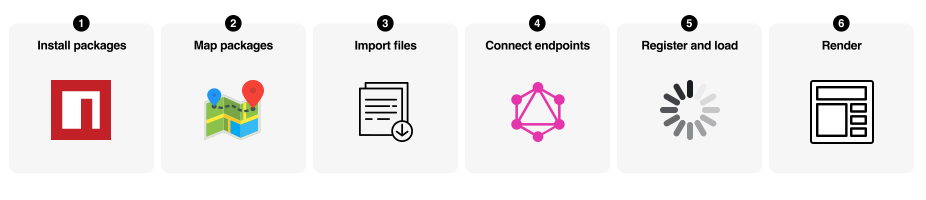
Section titled “How to use drop-ins”Three steps: import the initializerA JavaScript module that configures a drop-in when imported, such as setting endpoints, registering dictionaries, and preparing runtime behavior., import the containerA pre-built UI module that renders drop-in functionality and manages logic, state, and data for a feature., and render it. Most blocks use a single container.
Import the initializer
Section titled “Import the initializer”Import the initializer for the drop-in. This configures the GraphQL endpoint, loads placeholder text, and registers the drop-in.
// Import initializer (side-effect import handles all setup)import '../../scripts/initializers/auth.js';Import the container
Section titled “Import the container”Import the container you need and the render providerThe render function exported by a drop-in package that mounts containers into a storefront block.. Import maps in head.html resolve paths to the optimized code.
// Import the containerimport { SignIn } from '@dropins/storefront-auth/containers/SignIn.js';
// Import the providerimport { render as authRenderer } from '@dropins/storefront-auth/render.js';Render the container
Section titled “Render the container”Render the container in your block decorate functionThe JavaScript module that runs for a block after the page loads. It imports the initializer, then calls provider.render() to mount the drop-in UI into the block region of the page.. Pass configuration options to customize behavior.
import { rootLink } from '../../scripts/commerce.js';
export default async function decorate(block) { await authRenderer.render(SignIn, { routeForgotPassword: () => rootLink('/customer/forgot-password'), routeRedirectOnSignIn: () => rootLink('/customer/account'), })(block);}Complete example:
import { SignIn } from '@dropins/storefront-auth/containers/SignIn.js';import { render as authRenderer } from '@dropins/storefront-auth/render.js';import { rootLink } from '../../scripts/commerce.js';import '../../scripts/initializers/auth.js';
export default async function decorate(block) { await authRenderer.render(SignIn, { routeForgotPassword: () => rootLink('/customer/forgot-password'), routeRedirectOnSignIn: () => rootLink('/customer/account'), })(block);}Drop-in specific guides
Section titled “Drop-in specific guides”Each drop-in has its own Quick Start page with package names, versions, and drop-in-specific requirements:
- Cart
- Checkout
- Order
- Payment Services
- Personalization
- Product Details
- Product Discovery
- Recommendations
- User Account
- User Auth
- Wishlist
Advanced patterns
Section titled “Advanced patterns”These patterns show how to handle more complex scenarios in your blocks.
Multiple containers in one block
Section titled “Multiple containers in one block”Most blocks use a single container, but complex blocks can render multiple containers together. Use Promise.all() to render them in parallel for better performance. The Cart block demonstrates this pattern:
import '../../scripts/initializers/cart.js';import { render as provider } from '@dropins/storefront-cart/render.js';import CartSummaryList from '@dropins/storefront-cart/containers/CartSummaryList.js';import OrderSummary from '@dropins/storefront-cart/containers/OrderSummary.js';import { rootLink, getProductLink } from '../../scripts/commerce.js';
export default async function decorate(block) { // Create layout structure const fragment = document.createRange().createContextualFragment(` <div class="cart__list"></div> <div class="cart__order-summary"></div> `);
const $list = fragment.querySelector('.cart__list'); const $summary = fragment.querySelector('.cart__order-summary'); block.appendChild(fragment);
// Helper to create product links const createProductLink = (product) => getProductLink(product.url.urlKey, product.topLevelSku);
// Render multiple containers in parallel await Promise.all([ provider.render(CartSummaryList, { routeProduct: createProductLink, enableRemoveItem: true, })($list),
provider.render(OrderSummary, { routeCheckout: () => rootLink('/checkout'), })($summary), ]);}Nesting containers with slots
Section titled “Nesting containers with slots”Render containers inside other container slots for advanced composition. Use conditional logic to control which slots render:
import '../../scripts/initializers/cart.js';import { render as provider } from '@dropins/storefront-cart/render.js';import OrderSummary from '@dropins/storefront-cart/containers/OrderSummary.js';import EstimateShipping from '@dropins/storefront-cart/containers/EstimateShipping.js';import Coupons from '@dropins/storefront-cart/containers/Coupons.js';import { readBlockConfig } from '../../scripts/aem.js';import { rootLink, getProductLink } from '../../scripts/commerce.js';
export default async function decorate(block) { const { 'enable-estimate-shipping': enableEstimateShipping = 'false' } = readBlockConfig(block); const createProductLink = (product) => getProductLink(product.url.urlKey, product.topLevelSku);
await provider.render(OrderSummary, { routeProduct: createProductLink, routeCheckout: () => rootLink('/checkout'), slots: { EstimateShipping: async (ctx) => { if (enableEstimateShipping === 'true') { const wrapper = document.createElement('div'); await provider.render(EstimateShipping, {})(wrapper); ctx.replaceWith(wrapper); } }, Coupons: (ctx) => { const coupons = document.createElement('div'); provider.render(Coupons)(coupons); ctx.appendChild(coupons); }, }, })(block);}Combining multiple drop-ins
Section titled “Combining multiple drop-ins”Use multiple drop-ins in a single block when functionality overlaps. The Cart block combines Cart and Wishlist:
// Import event busimport { events } from '@dropins/tools/event-bus.js';
// Import initializers for both drop-insimport '../../scripts/initializers/cart.js';import '../../scripts/initializers/wishlist.js';
// Import from both drop-insimport { render as provider } from '@dropins/storefront-cart/render.js';import CartSummaryList from '@dropins/storefront-cart/containers/CartSummaryList.js';import * as Cart from '@dropins/storefront-cart/api.js';
import { render as wishlistRender } from '@dropins/storefront-wishlist/render.js';import { WishlistToggle } from '@dropins/storefront-wishlist/containers/WishlistToggle.js';import { WishlistAlert } from '@dropins/storefront-wishlist/containers/WishlistAlert.js';
import { getProductLink } from '../../scripts/commerce.js';
export default async function decorate(block) { // Create notification area const fragment = document.createRange().createContextualFragment(` <div class="cart__notification"></div> `); const $notification = fragment.querySelector('.cart__notification'); block.appendChild(fragment);
// Wishlist route const routeToWishlist = '/wishlist';
// Helper to create product links const createProductLink = (product) => getProductLink(product.url.urlKey, product.topLevelSku);
// Render cart with wishlist functionality in slots await provider.render(CartSummaryList, { routeProduct: createProductLink, slots: { Footer: (ctx) => { // Add wishlist toggle to each cart item const $wishlistToggle = document.createElement('div'); $wishlistToggle.classList.add('cart__action--wishlist-toggle');
wishlistRender.render(WishlistToggle, { product: ctx.item, removeProdFromCart: Cart.updateProductsFromCart, })($wishlistToggle);
ctx.appendChild($wishlistToggle); }, }, })(block);
// Listen for wishlist events events.on('wishlist/alert', ({ action, item }) => { wishlistRender.render(WishlistAlert, { action, item, routeToWishlist, })($notification);
setTimeout(() => { $notification.innerHTML = ''; }, 5000); });}Using API functions without containers
Section titled “Using API functions without containers”Call API functions directly for programmatic control without rendering UI:
import '../../scripts/initializers/cart.js';import * as Cart from '@dropins/storefront-cart/api.js';import { events } from '@dropins/tools/event-bus.js';
export default async function decorate(block) { // Get cached cart data synchronously const cachedCart = Cart.getCartDataFromCache(); console.log('Cached cart:', cachedCart);
// Fetch fresh cart data const freshCart = await Cart.getCartData(); console.log('Fresh cart:', freshCart);
// Add products programmatically const button = block.querySelector('.add-to-cart-button'); if (button) { button.addEventListener('click', async () => { try { await Cart.addProductsToCart([ { sku: 'ABC123', quantity: 1 } ]); console.log('Product added successfully'); } catch (error) { console.error('Failed to add product:', error); } }); }
// Update cart totals in custom UI events.on('cart/data', (cartData) => { const totalElement = block.querySelector('.cart-total'); if (totalElement && cartData?.prices?.grandTotal) { totalElement.textContent = cartData.prices.grandTotal.value; } }, { eager: true });}Error handling
Section titled “Error handling”Handle errors gracefully with try/catch blocks and user notifications:
import createMiniPDP from '../../scripts/components/commerce-mini-pdp/commerce-mini-pdp.js';import createModal from '../modal/modal.js';import { fetchPlaceholders } from '../../scripts/commerce.js';
export default async function decorate(block) { const placeholders = await fetchPlaceholders(); let currentModal = null;
// Custom message display function const showMessage = (message) => { const messageEl = block.querySelector('.mini-cart__message'); if (messageEl) { messageEl.textContent = message; messageEl.classList.add('visible'); setTimeout(() => messageEl.classList.remove('visible'), 3000); } };
async function handleEditButtonClick(cartItem) { try { // Attempt to load and show mini PDP const miniPDPContent = await createMiniPDP(cartItem); currentModal = await createModal([miniPDPContent]);
if (currentModal.block) { currentModal.block.setAttribute('id', 'mini-pdp-modal'); }
currentModal.showModal(); } catch (error) { console.error('Error opening mini PDP modal:', error);
// Show error message using mini-cart's message system showMessage(placeholders?.Global?.ProductLoadError || 'Failed to load product'); } }
// ... rest of block implementation}What the boilerplate provides
Section titled “What the boilerplate provides”The boilerplate includes everything you need:
- Drop-in packages installed in
package.json. - Optimized code in
scripts/__dropins__/. - Import maps in
head.html. - Initializers in
scripts/initializers/for automatic setup. - Example blocks demonstrating usage.
How it works
Section titled “How it works”The following diagram shows how drop-ins integrate into your boilerplate project:
Additional concepts
Section titled “Additional concepts”Additional terms you’ll encounter as you work with drop-ins.
Drop-in
A self-contained Commerce component (Cart, Checkout, Product Details) that includes containers, API functions, and events.
Import maps (in head.html)
Configuration that maps clean import paths (for example, @dropins/storefront-cart) to optimized code in scripts/__dropins__/. The boilerplate includes these pre-configured.
Event bus (@dropins/tools/event-bus.js)
Pub/sub system for drop-in communication. Drop-ins emit events when state changes (for example, cart/data, checkout/updated). Listen to events to update custom UI or trigger logic.
API functions
Programmatic interfaces to control drop-in behavior without rendering UI. Fetch data, trigger actions, and read cached state (for example, Cart.addProductsToCart(), Cart.getCartData()).
Slots
Extension points in containers where you can inject custom content or replace default behavior. Used for deep customization beyond configuration options.
Summary
Section titled “Summary”The boilerplate makes using drop-ins straightforward: import an initializer for automatic setup, import the containers you need, render them with configuration options, and optionally listen to events for custom behavior. No manual package installation or complex configuration required.