
Quick Order overview
The Quick Order B2B drop-in introduces two purchasing workflows for Adobe Storefront, designed for B2B buyers who need to place orders quickly and efficiently.
The drop-in delivers two core features:
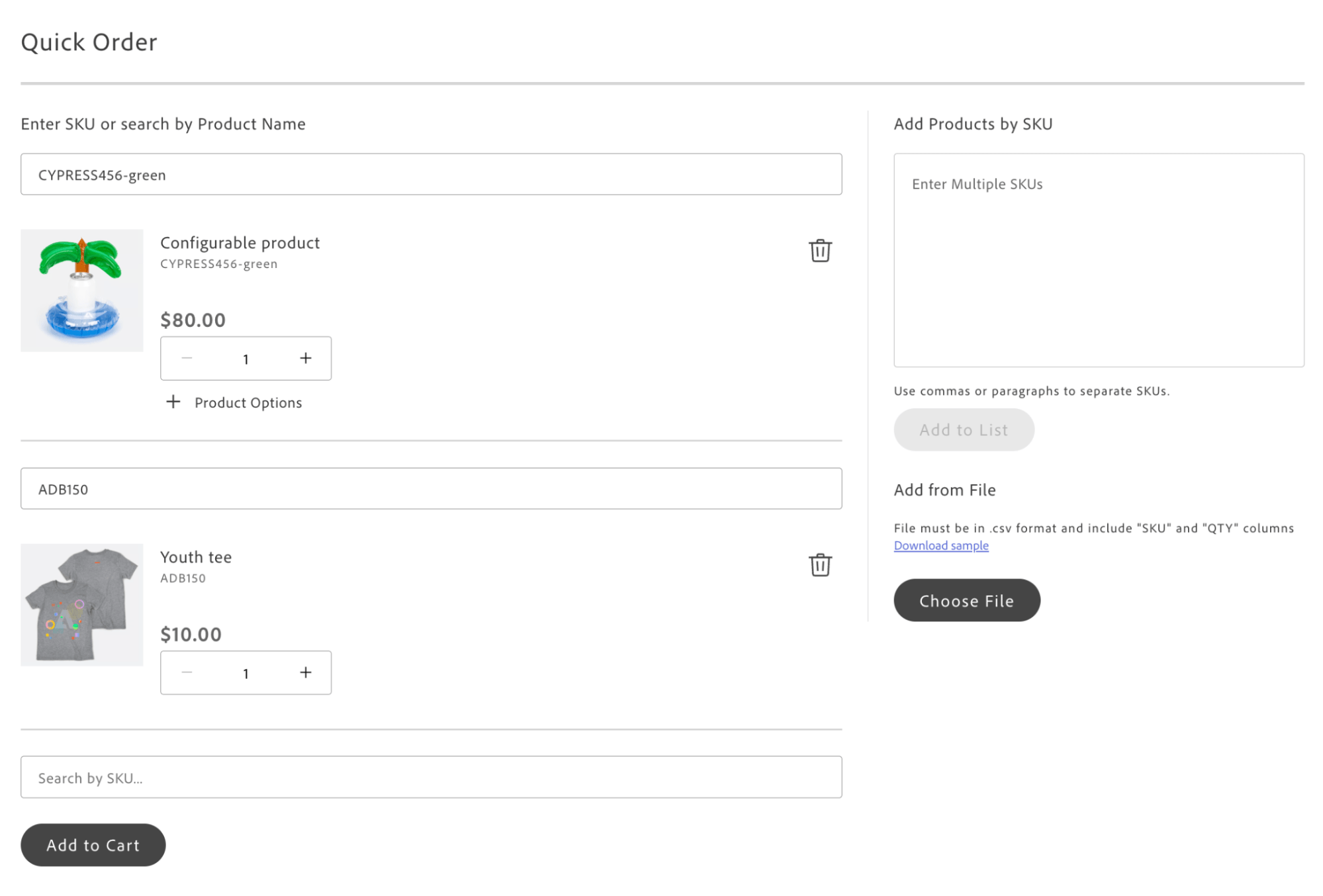
- Quick Order — A fast product ordering interface that provides functional parity with the Adobe Commerce Quick Order experience. Customers add products to an order list using SKU search, CSV upload, or multiple SKU input.
- Grid Ordering — A new B2B ordering experience exclusive to Adobe Storefront. Buyers add multiple configurable product variants to the cart from a single grid interface.
The drop-in consists of four containers: QuickOrderCsvUpload, QuickOrderItems, and QuickOrderMultipleSku for the Quick Order page, and QuickOrderVariantsGrid for Grid Ordering on the PDP. The Quick Order workflow suits buyers who need to add known products quickly without navigating catalog pages.
Containers communicate via the event bus, ensuring loose coupling and flexible extensibility. Any container can be replaced with a custom implementation that follows the defined event contracts. By default, Quick Order does not enforce additional permissions or access restrictions beyond your storefront’s existing authentication.
The Quick Order page is implemented in the commerce-b2b-quick-order block . Grid Ordering is integrated into the product-details block .
Supported Commerce features
Section titled “Supported Commerce features”The following table provides an overview of the Adobe Commerce features that the Quick Order drop-in supports:
| Feature | Status |
|---|---|
| Quick Order page (bulk add by SKU/search) | Supported |
| Multiple SKU text entry | Supported |
| CSV file upload (SKU, QTY) | Supported |
| Product search by SKU and name | Supported |
| Configurable product options in Quick Order | Supported |
| Bulk add to cart with validation | Supported |
| Grid Ordering on PDP (configurable variants) | Supported |
Quick Order feature toggle (quickOrderActive) | Supported |
| Event-driven container coordination | Supported |
| Internationalization (i18n) support | Supported |
| Integration with Cart and PDP drop-ins | Supported |
Section topics
Section titled “Section topics”- Quick Start — Package details, import paths, and block example. New to drop-ins? See Using drop-ins.
- Initialization — Configure the initializer with language definitions and store config (
quickOrderActive). - Containers — QuickOrderCsvUpload, QuickOrderItems, QuickOrderMultipleSku (Quick Order page); QuickOrderVariantsGrid (Grid Ordering on PDP). Covers container configuration and how the containers work together.
- Functions — API functions (for example,
getStoreConfig) for store configuration. - Events — Event bus usage:
quick-order/add-items,quick-order/loading,quick-order/add-to-cart,quick-order/add-to-cart-error,cart/product/added. See Event bus reference. - Slots — Customize
ProductPrice,ProductOptions,AddAllToCartButton, and search slots. See Extending drop-ins. - Dictionary — i18n keys for labels and messages. See Dictionary customization.
- Styles — CSS classes for the block and containers. See Styling.