
Content requests and storefront usage
One page view on your storefront usually counts as more than one content request toward the allowance in your license. The shopper sees one page, but the browser builds that page from several separate requests, and each eligible request counts.
Content requests are an Adobe Experience Manager (AEM) usage measure. Your storefront pages are delivered by Edge Delivery Services, which is part of AEM, so AEM rules decide what counts. In the example estimate, one product page view adds up to about 2.4 content requests:
- Counted: the page HTML (1 content request) and 7 JSON data files (7 ÷ 5 = 1.4 content requests)
- Not counted: HTML fragments, such as the navigation and footer; Commerce API calls that your content delivery network (CDN) sends to Commerce; and images, style sheets, and JavaScript files
How requests are counted
Section titled “How requests are counted”Unless an exclusion applies, the AEM counting definition counts responses by type:
- HTML: Each HTML response, such as the page itself, counts as one content request.
- JSON: Every five JSON responses, such as storefront data files, count as one content request.
HTML fragments are one of those exclusions. The storefront loads fragments, such as the navigation and footer, from URLs that end in .plain.html, and AEM doesn’t count .plain.html responses.
Which requests count
Section titled “Which requests count”The following traffic counts when it delivers eligible HTML or JSON page content and no exclusion applies. HTTP status codes describe the result of a request.
| Included traffic | Counting rule |
|---|---|
| HTML or JSON page content | Included status range 100-299, including partial content returned with 206. |
| CDN cache hits | Counted once, at the first caching system that receives the request, even when the CDN serves a cached copy. |
| Prefetched content | Counted when fetched, even if the shopper never opens the page. |
| Automation and monitoring | Included unless a recognized bot or a specific monitoring exclusion applies. |
| Visits missing from analytics | Still counted when consent settings or tracking blockers prevent analytics from recording the visit. |
Which requests are excluded
Section titled “Which requests are excluded”These requests don’t consume your content request allowance.
| Excluded traffic | Scope of the exclusion |
|---|---|
| Static assets | Images, style sheets, and JavaScript files. |
| HTML fragments | Responses whose URL ends in .plain.html, such as the navigation and footer that the storefront’s fragment loader requests. |
| Redirects and errors | Status codes 300-399, 400-499, and 500 or above. A subsequent successful content request can still count. |
| Recognized bots | Identified search, social, and AI crawlers. Unrecognized automation can count. |
| Detected attacks | Traffic AEM identifies and blocks as a distributed denial-of-service attack. |
| Specified health checks | Excluded AEM monitoring mechanisms. For Edge Delivery availability checks, AEM recommends HEAD instead of GET requests. |
| Responses from other services | Requests that never reach AEM, such as Commerce API calls that your CDN routes to Commerce. |
| Specific Commerce Integration Framework calls | Requests made to AEM and forwarded through /api/graphql. |
For all exclusions, including AEM internal requests and specific content reuse rules, see AEM content request rules .
Estimate content requests for a page
Section titled “Estimate content requests for a page”Your browser’s network tools list the requests a page makes, so you can estimate the content requests for any storefront page. These steps use the Chrome DevTools Network panel . Other browsers have similar tools. The screenshots in these steps show requests from a product page on an Adobe demo storefront.

-
Open a page on your production site in Chrome.
Only production traffic counts toward your allowance.
-
Open your browser’s developer tools, and then select the Network tab.
-
Select Disable cache, and then reload the page.
Disabling the cache shows the requests a first-time visitor makes. DevTools lists only the requests made while it is open, so reload the page after you open it.
-
In the Filter box, enter the following filter. Replace
www.example.comwith your storefront’s domain.domain:www.example.com mime-type:text/htmlThe status bar at the bottom of the panel shows the number of matching requests, followed by the total. Record the first number as your listed HTML count.
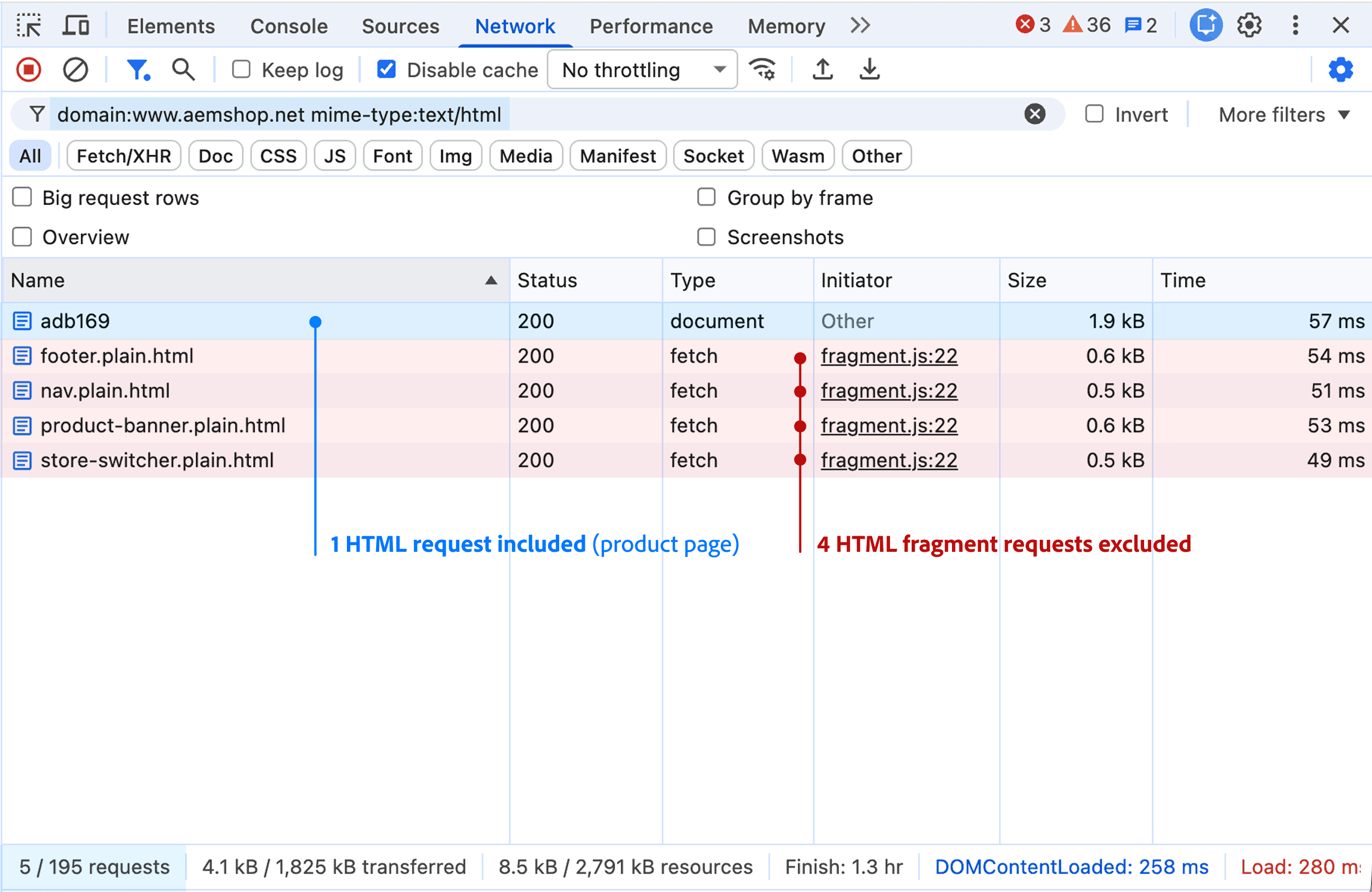 The HTML filter lists the page document and four fragments.
 -
Replace the filter with the following one, and record your listed JSON count the same way.
domain:www.example.com mime-type:application/json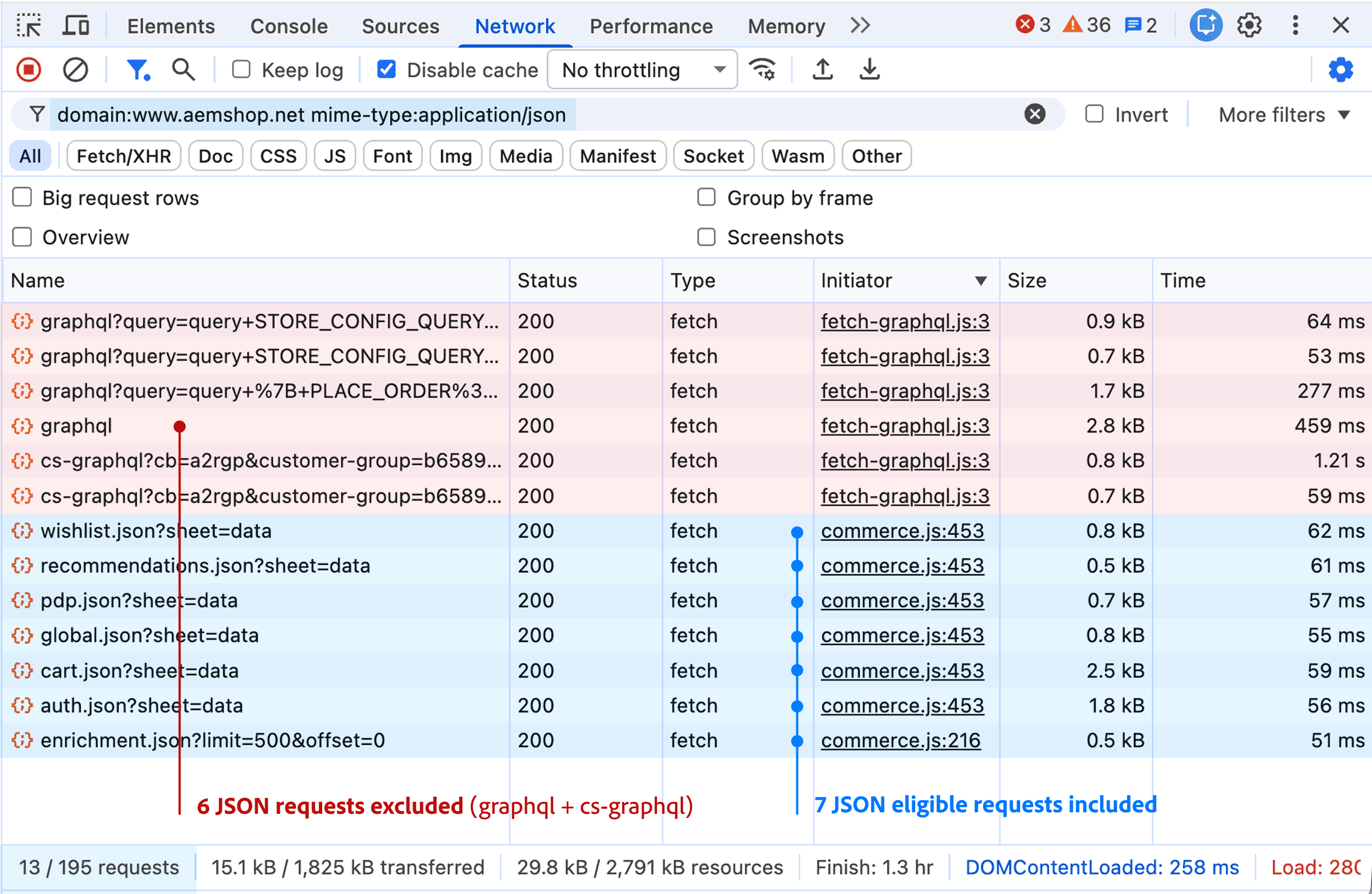 The JSON filter lists seven storefront data files and six Commerce API calls.
 -
Subtract the listed requests that don’t count:
- Redirects and errors: any request whose Status column shows a value outside 200 to 299, such as 301 or 404.
- HTML fragments: any request whose name ends in
.plain.html, such asnav.plain.htmlorfooter.plain.html. - Commerce API calls: any request whose name starts with
graphqlorcs-graphql. Your CDN routes these to Commerce, so they never reach AEM.
You don’t need to check for other exclusions. The filters already hide images, style sheets, scripts, and requests to other domains, and your own browser visit isn’t bot or monitoring traffic.
-
Add your remaining HTML count to your remaining JSON count divided by five.
For the example page, that’s 1 + (7 ÷ 5) = 2.4 content requests.
Example estimate for a product page
Section titled “Example estimate for a product page”The following table applies the estimation steps to the product page in the screenshots. The four fragments use .plain.html URLs, and that storefront’s CDN routes its graphql and cs-graphql paths to Commerce, so neither group counts.
| Requests | Counts | Initial | Exclusion Rules | Content requests |
|---|---|---|---|---|
| Product page | 1 HTML request | 1 | Included: HTML or JSON page content | 1 |
| Fragments, such as footer, nav, etc. | 4 HTML requests | 4 | Excluded HTML fragments | 0 |
| Storefront data files, such as cart.json | 7 JSON requests | 7 ÷ 5 = 1.4 | Included: HTML or JSON page content | 1.4 |
| graphql and cs-graphql calls | 6 JSON requests | 6 ÷ 5 = 1.2 | Excluded Responses from other services | 0 |
| TOTAL FOR PAGE | 5 HTML and 13 JSON requests | 1 + 4 + 1.4 + 1.2 = 7.6 | Excluded 4 fragments (-4) and 6 Commerce API calls (-1.2) | 1 + 1.4 = 2.4 |