
Personalization
Display personalized content to specific customer segments, groups, or cart rules using Targeted Blocks. This enables you to show different promotions, messaging, or content to different customer types without creating separate pages.
Vocabulary
Targeted Block
A block that wraps content targeted for specific customer groups, segments, or cart rules.
Group
(Adobe Commerce Customer Group) assigned to the customer.
Segment
(Adobe Commerce Customer Segment) that applies to the customer.
Cart Rule
(Adobe Commerce Cart Price Rule) that applies to the customer cart.
Configuration parameters
Targeted Blocks accept the following parameters to control which customers see the content:
Implementation examples
Follow these examples to implement different personalization scenarios using Targeted Blocks:
Target specific customer segments
Specify comma-separated customer segment IDs from Adobe Commerce to ensure the block displays only for customers matching these segments.
-
Identify the customer segment IDs in your Adobe Commerce Admin.
-
Create a Targeted Block table in your document.
-
Add the segment IDs to the Customer Segments parameter.
The content in this example displays only to customers in segments 1 and 2:

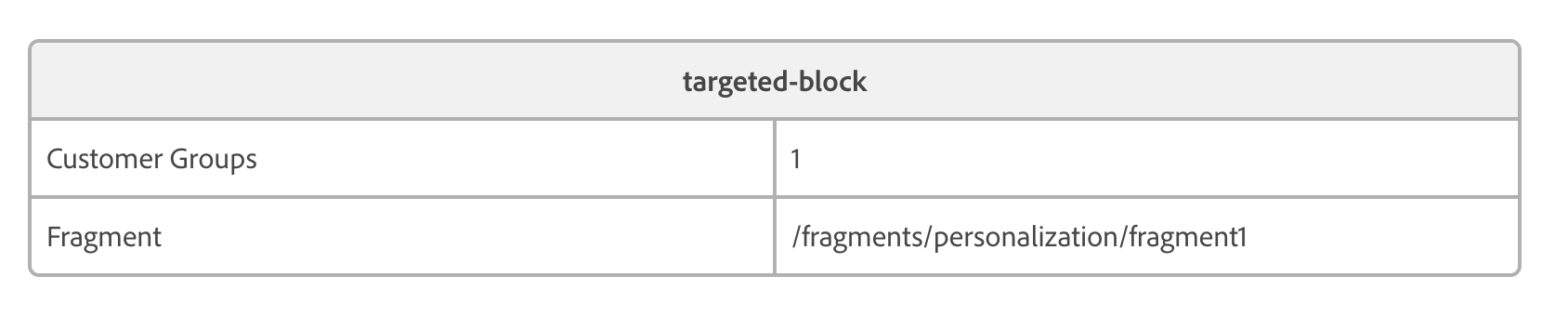
Load content from a fragment
Instead of embedding content directly in the Targeted Block, specify a path to a fragment. The system loads content from the specified document path and displays it as the Targeted Block content.
-
Create a separate document containing your personalized content.
-
Note the document path (e.g.,
/fragments/promo-banner). -
In your Targeted Block, specify this path in the Fragment parameter.
This example loads content from the document path specified in the fragment property:
Create fallback content using block type
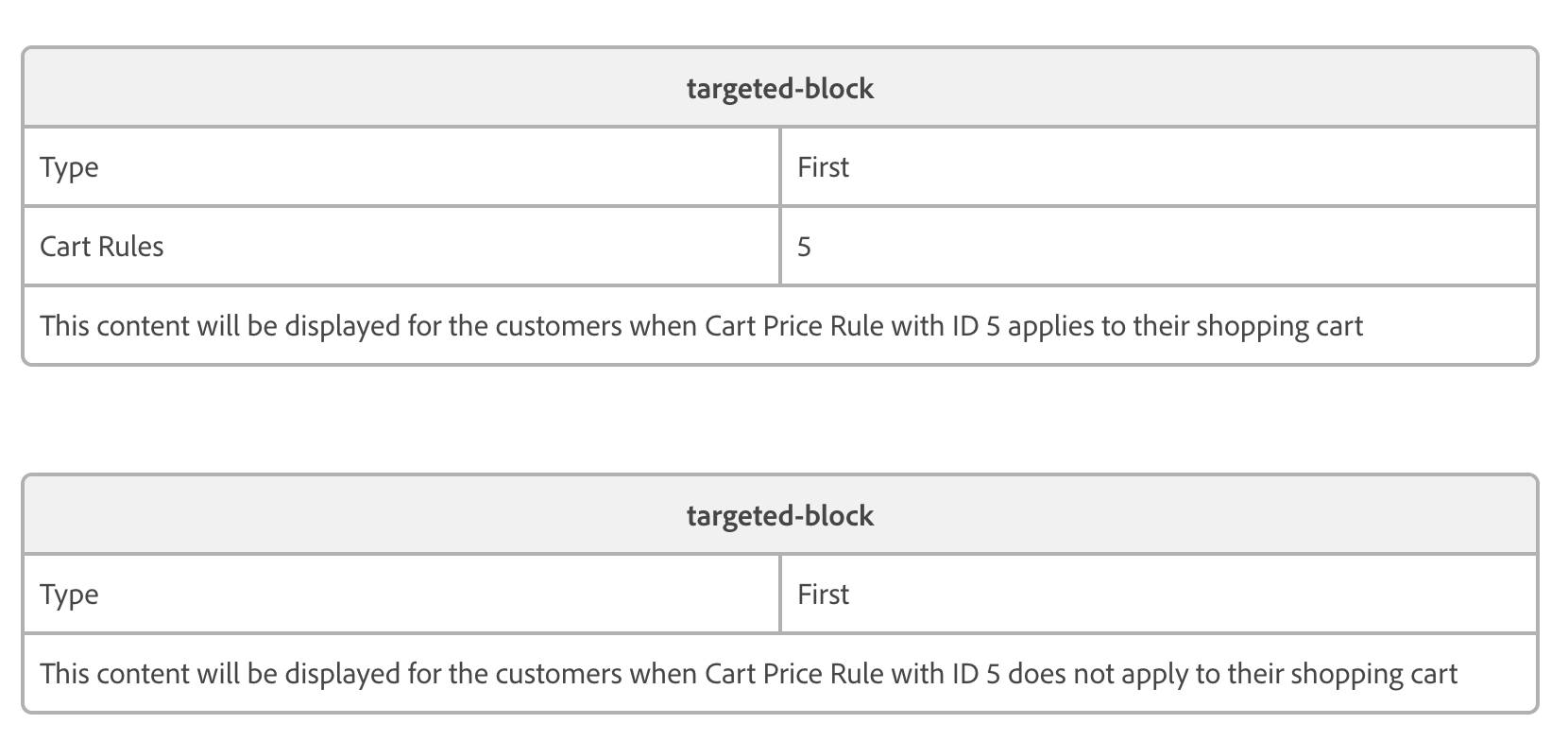
When multiple Targeted Blocks on a page share the same type, only the first matching Targeted Block displays to the customer. This fallback behavior enables you to configure a Targeted Block with default content visible to everyone, which specific blocks for particular groups or segments can then replace.
-
Create a Targeted Block with specific targeting rules (segments, groups, or cart rules).
-
Set the Type parameter to a meaningful value (e.g.,
hero-banner). -
Create a second Targeted Block with no targeting rules (displays to all customers).
-
Set the same Type value on the second block.
-
The second block serves as fallback when the first block doesn’t match.
In this example, the first Targeted Block displays only to customers whose shopping cart meets the conditions of cart price rule ID 5. The second Targeted Block has no conditions and should display to all customers. However, because both blocks share the same “Type” value, the second block will not display when the first block is active. Blocks with the same type replace each other in the display hierarchy:
Tips for merchants
- Test Targeted Blocks by switching between different customer groups in your storefront
- Use fragments for complex interactive content that needs to be reused across pages
- Create default content with no targeting rules as fallback for customers who don’t match any segments
- Use the Type parameter to create layered fallback chains for progressive personalization